
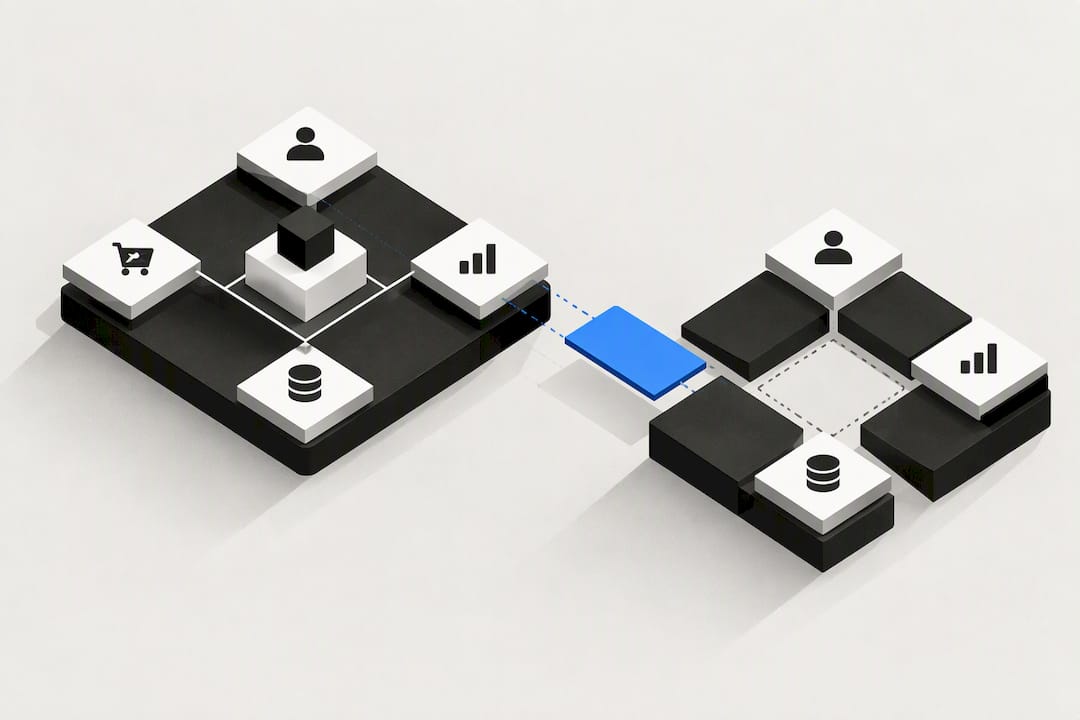
Unified customer data is a single, governed customer profile that combines identifiers, behaviours and transactions into a real-time customer 360 for personalised activation. It matters because AI decisioning, support routing and advertising all need one trustworthy version of the customer, not five disconnected ones. Building it well requires identity resolution, clear architecture choices and ongoing governance.
TL;DR:
- Building a unified customer profile involves real-time ingestion from multiple sources, including behavioral, transactional, and support data, linked through identity resolution.
- Identity resolution relies on deterministic matching for exact identifiers and probabilistic matching when only weak signals are available, with safeguards against incorrect merges.
- Three architecture options exist: warehouse-native, composable stack, and integrated system, each with different control, flexibility, and compliance trade-offs.
- Achieving true real-time updates depends heavily on architecture, with low-latency systems supporting sub-second profile activation for AI decisioning.
- A phased approach starting with inventory, a single use case, and incremental expansion minimizes risk and cost, emphasizing data quality and governance throughout.
Table of Contents
- What unified customer data (customer 360) actually means
- How unification works: collection, resolution, computation, activation
- Architecture options and trade-offs
- Identity resolution and guarding the identity graph
- Benefits and common use cases that justify investment
- A pragmatic implementation roadmap and prioritisation
- How OK Technology approaches unified customer data
- Why AI-native personalisation demands continuously governed profiles
- Get your unified customer data project moving
- Sources
- FAQ
What unified customer data (customer 360) actually means
A unified customer profile stitches together every signal a business holds about one person into a single, addressable record. That record combines identifiers (email, device ID, loyalty number), transactions, support tickets, website behaviour and enrichment data from third parties. The result, often called a customer 360, gives every team the same answer when they ask "who is this person and what do they want?"
This is different from what most businesses already have. A CRM stores structured records that sales and support teams enter manually. A data management platform (DMP) traditionally handled anonymous, cookie-based advertising segments with a short shelf life. A raw data warehouse holds everything but nothing is stitched, deduplicated or made queryable in real time. A customer data platform (CDP) sits between these, ingesting from all three and producing a persistent, addressable profile that other systems can call on demand.
The distinction matters operationally. A CRM answers "what did this person buy from us." A unified profile answers "what did this person do everywhere, and what should we do next." That second question is what AI-driven personalisation and support systems actually need, and analysts increasingly treat it as an operational requirement rather than a marketing nice-to-have, according to Forrester's commentary on customer experience.
A properly built unified profile typically includes:
- Identity data: emails, phone numbers, device IDs, loyalty and account numbers used to link records to one person.
- Behavioural data: page views, app events, email opens, search queries and product usage patterns.
- Transactional data: purchases, refunds, subscription changes and billing history.
- Support and service data: tickets, chat transcripts, call notes and resolution outcomes.
- Enrichment data: firmographic or demographic attributes pulled from third-party sources to fill gaps.
None of these data types alone constitutes a unified profile. A warehouse full of behavioural events with no identity resolution is just a pile of anonymous rows. The unification step, linking all five categories to one canonical customer, is the part most teams underestimate when they start this kind of project.
How unification works: collection, resolution, computation, activation
Building a unified profile is a four-stage process, and each stage has real engineering decisions attached to it, not just conceptual ones.
Collection starts with ingestion. Streaming pipelines (via tools like Kafka or vendor-native event SDKs) capture behavioural and transactional events as they happen, while batch jobs pull structured data from CRMs, billing systems and support platforms on a schedule, often hourly or nightly. Most mature stacks run both simultaneously: streaming for time-sensitive signals like cart abandonment, batch for slower-moving reference data like account tier changes.
Identity resolution is where separate records become one profile. Two techniques dominate:
- Deterministic matching links records using exact identifiers, an email or a loyalty ID that appears in both records. It is highly accurate but only works when a shared identifier actually exists.
- Probabilistic matching infers a likely match from a combination of weaker signals, such as device fingerprint, IP range and browsing pattern, when no exact identifier is shared.
Production-grade systems combine both, following a multi-stage pipeline: pre-processing to normalise identifiers, blocking to narrow the comparison space, matching to score candidate pairs, and clustering to group matched pairs into a single customer node. PayPal's engineering team describes exactly this pipeline in their approach to building a knowledge graph for unified customer entities, which resolves identity at production scale using these four stages in sequence.
Profile computation produces the canonical record other systems will query. This means assigning a stable unified customer ID (UCID), calculating computed traits (lifetime value, churn risk, next-best-action), and deciding how fresh each trait needs to be. A "last purchase date" can tolerate a few hours of staleness; a "currently browsing" flag for real-time personalisation cannot.
Activation pushes the finished profile back out to the tools that use it, ad platforms, email systems, support consoles, personalisation engines. This happens either through native connections built into the platform, direct API calls for real-time use cases, or reverse ETL tools that copy profile data from a warehouse into downstream apps on a schedule.
Pro Tip: Decide your freshness requirement per use case before choosing a tool. A support agent needing the last support ticket in under a second has a completely different architecture requirement than a quarterly churn model, and building for the strictest case everywhere wastes budget.
Architecture options and trade-offs
Three architecture patterns dominate unified customer data projects today, and the choice between them has real security and operational consequences, not just cost implications.
A warehouse-native approach keeps the unified profile inside the existing data warehouse (Snowflake, BigQuery, Databricks) and builds identity resolution and activation logic on top of it. The Warehouse Native CDP model centralises storage and automates identity stitching while data teams retain control over the underlying tables. Done well, with streaming ingestion, incremental transforms and a low-latency serving layer, a warehouse-native stack can support both real-time and batch use cases from the same source of truth.
A composable stack assembles best-of-breed tools for each function: one vendor for identity, another for activation, another for reverse ETL. This avoids vendor lock-in and lets teams swap components as needs change. The trade-off is real: every additional vendor is another place where personally identifiable data lives, gets copied, and needs a separate data processing agreement. The CISO's guide to CDP architecture decisions makes the point plainly, composable architectures increase vendor boundary count, which raises the audit surface for SOC 2 reviews and complicates how quickly a deletion request propagates across every system holding a copy.
An integrated or agentic CDP consolidates unification, decisioning and activation inside one system with fewer external hops. Fewer vendor boundaries generally means fewer DPAs to negotiate, a smaller SOC 2 scope and faster, more traceable deletion propagation when a customer exercises a privacy right.
The trade-offs in brief:
- Warehouse-native: strong control and cost efficiency, but requires in-house engineering capacity to build and maintain identity logic.
- Composable: maximum flexibility per function, but the highest vendor boundary count and the most compliance overhead to manage.
- Integrated/agentic: fastest to activate and simplest to audit, but less flexibility to swap individual components later.
"Real-time" is achieved differently across all three. In a composable stack it usually means a reverse ETL job running every few minutes, copying warehouse data into an activation tool. In a well-built warehouse-native or integrated system, it can mean genuine sub-second serving from a dedicated low-latency layer. When evaluating a vendor's real-time claim, ask specifically what the actual latency is between an event happening and a profile update being queryable, the answer varies by an order of magnitude depending on architecture.
Identity resolution and guarding the identity graph

Identity resolution runs on transitivity: if identifier A links to B, and B links to C, the system infers A, B and C belong to one customer. This is powerful, it lets a business recognise the same person across an anonymous browser session, a mobile app login and a call centre record without needing a single shared identifier. It is also the single biggest source of catastrophic errors in unified profiles.
The risk is what practitioners call graph collapse: two unrelated people get merged into one profile because they briefly shared a device, an IP address, or a mislabelled identifier. Once that merge happens, every downstream system, personalisation, billing, support, starts treating two different customers as one. Adobe's identity resolution documentation addresses this directly, recommending namespace uniqueness and namespace priority rules as the primary guardrail: each identifier type is scoped to a namespace, and priority rules determine which identifier wins when two namespaces conflict.
A practical benchmark: teams running production identity graphs at scale, as PayPal's engineering team documents, treat merge rate as a first-class operational metric, not an afterthought. A sudden spike in the rate at which unrelated identifiers get linked is usually the earliest warning sign of a graph collapse in progress, often well before customer complaints surface.
Three practical rules keep an identity graph reliable:
- Enforce namespace uniqueness so a shared device or IP address never silently becomes a hard match on its own.
- Build singleton recovery into the pipeline, the ability to unmerge a wrongly clustered identifier back to its own profile without rebuilding the whole graph.
- Monitor merge rates continuously and alert on deviations, with the ability to replay the graph from raw identifiers if a bad rule change needs reversing.
Shared-device households (a family tablet, a shared work laptop) are the most common real-world trigger for false merges. Any resolution logic that treats device ID as a strong deterministic match without a secondary confirming signal will eventually merge people who have never met.
Benefits and common use cases that justify investment
The return on a unified profile shows up fastest in three areas: personalisation, support and advertising.
Personalisation and AI decisioning benefit most directly, because recommendation and next-best-action models are only as good as the profile feeding them. Analysts increasingly frame this as the core justification for investment, arguing that AI-native decisioning requires continuously updated profiles rather than the static, batch-refreshed segments most businesses still run on, a shift Forrester's research describes as moving from periodic snapshots to continuously live records.
Support and routing improve when an agent sees the full picture, recent purchases, open tickets, browsing activity, the moment a conversation starts, instead of hunting across four systems while a customer waits on hold.
Advertising and measurement gain from de-duplicated audiences and cleaner attribution. Without unification, the same customer often appears as three separate people across ad platforms, inflating reach numbers and muddying which channel actually drove a conversion.
Common use cases that typically deliver first returns include:
- Real-time personalisation on-site and in-app, based on the most recent behavioural signal, not last week's segment.
- Unified support context, giving agents one screen instead of five tabs.
- De-duplicated ad audiences, reducing wasted spend on customers counted multiple times.
- Churn and lifetime value modelling, which needs transaction and behavioural history in one place to be accurate.
- Cross-channel attribution, connecting an email click to an in-store purchase weeks later.
Teams that treat these as sequential wins, starting with the use case that has the clearest data already in reasonably good shape, see returns faster than teams that try to unify everything before activating anything.
A pragmatic implementation roadmap and prioritisation
Unifying customer data is not a single project with a finish line. It is a phased build where each stage should prove value before the next one gets funded. Membership and association bodies that have gone through this successfully tend to follow a similar pattern: inventory first, prove value with a narrow use case, then expand, a sequence ASAE's guidance on centralised data strategy lays out clearly for organisations short on both budget and patience.
- Inventory your data sources and their quality. List every system holding customer data, CRM, billing, support desk, website analytics, and rate each on completeness and how often it is actually updated. This step alone usually surfaces data no one remembered existed, and duplicate systems doing the same job.
- Pick one use case and stitch only what it needs. Rather than attempting to resolve every identifier across every system at once, choose the highest-value use case, often support context or email personalisation, and unify just the identifiers that use case requires.
- Activate through a single channel first. Prove the profile works by feeding it into one system, a personalisation widget or a support console, before expanding to five channels simultaneously.
- Expand the identity graph and add governance. Once the first activation is stable, bring in additional identifiers, automate the matching rules, and formalise privacy and retention policies as more sensitive data joins the graph.
- Move to continuous optimisation. Track freshness, merge accuracy and activation success as ongoing metrics, tuning matching rules and expanding use cases as confidence grows.
The KPIs worth tracking from day one: profile freshness (time between an event and its availability in the profile), merge error rate (how often unrelated identifiers get wrongly linked), activation success rate (how often a downstream system successfully retrieves and uses a profile), and time to value (how long from project start to the first measurable business outcome).
Pro Tip: *Resist the urge to build a "perfect" identity graph before activating anything.
How OK Technology approaches unified customer data
Most unified customer data projects stall not because the technology is hard, but because the data lives across too many disconnected tools before anyone even starts stitching it together. Oktechnology's platform addresses that upstream problem directly by consolidating CRM, marketing automation, billing, project management and document storage into one ecosystem, rather than asking a business to unify data that is scattered across six separate vendors first.
That consolidation matters for the roadmap above. Phase one, inventorying data sources, gets considerably shorter when leads, invoices, campaigns and contracts already sit inside one system rather than needing to be mapped across a CRM, a separate billing tool and a separate email platform. Businesses consolidating tool sprawl this way can potentially save significant time previously lost to switching between disconnected systems and reconciling mismatched records.
The pay-per-action pricing model gives teams a genuinely lower-risk way to phase adoption, which matters given how many unification projects fail from trying to do everything at once. Rather than committing to a tiered plan, actions are billed individually, generating a CRM lead, sending a campaign, creating an invoice, storing a document, so a team can start with one use case, prove it works, and expand spend only as the next phase justifies it.
For teams that need help beyond self-serve setup, Oktechnology offers hourly business consulting for strategic questions like use-case prioritisation, and separate technical help for integration and data mapping work, both engaged only when needed rather than bundled into a fixed retainer.
Why AI-native personalisation demands continuously governed profiles
Most unified customer data efforts were built for a world of batch segments, refreshed weekly, queried by a human marketer. That world is disappearing. AI agents making real-time decisions, what to recommend, what to say, what price to offer, need what analysts are calling continuously updated "diamond" records, profiles that are always current, not periodically refreshed.
That shift changes what "good enough" looks like operationally. A stale segment used to mean a slightly outdated email campaign. A stale profile feeding an AI agent means the agent is making live decisions on wrong information, at scale, with no human checking each one. Governance, latency monitoring and merge-rate alerting stop being nice-to-haves and become the guardrails that keep automated decisions trustworthy.
The strategic takeaway is straightforward: businesses investing in AI decisioning without first fixing profile freshness and identity accuracy are building automation on a foundation that will not hold.
— Paolo
Get your unified customer data project moving
Oktechnology is the practical alternative to stitching together a CRM, a marketing tool, a billing system and a data warehouse from four different vendors just to get one customer view. Because CRM, marketing automation, billing and document storage already sit inside one platform, the identity resolution and data mapping work described earlier in this guide starts from a much smaller inventory, fewer systems, fewer vendor boundaries, less reconciliation.
The pay-per-action model means you are not locked into a plan tier to find out whether unification delivers value for your use case. Costs vary depending on actions used, such as CRM leads and document storage; specific pricing details are available on the provider's pricing page, allowing a first phase to be scoped and costed before committing further. If outside expertise is needed, business consulting and technical help services are offered on an hourly basis and engaged only when required.
The full breakdown of pricing across every action is public, so you can cost out your own phase one before speaking to anyone. If you would rather talk through your specific data sources and use case first, that conversation is the sensible next step before writing a single line of integration code.
Sources
The technical claims in this guide draw on a small set of sources worth reading directly if you are scoping your own project. The CDP Institute and RudderStack identity resolution playbook gives concrete patterns for warehouse-native architectures that need both real-time and batch profiles. PayPal's engineering team documents their production identity graph approach in enough detail to be genuinely useful for anyone designing matching and clustering logic at scale. Adobe's identity optimisation documentation is the clearest public explanation of namespace rules available from a major platform vendor. For the security and compliance side, the CISO's guide to CDP architecture lays out vendor boundary trade-offs that most marketing-focused guides skip entirely. Teams building a data pipeline from scratch may also find value in Vetros's work on data product architecture.
- The identity resolution playbook — CDP Institute / RudderStack
- Customer Graph: PayPal's knowledge graph for unified customer entity — PayPal Developer Blog
- Identity Optimization Algorithm — Adobe Experience Platform documentation
- Cdp
FAQ
What is a CDP versus a CRM?
A CRM stores structured records that people manually enter, contacts, deals, tickets, while a CDP automatically ingests data from many sources and resolves it into a single, continuously updated customer profile. A CDP typically feeds a CRM with richer context rather than replacing it.
What does "unified data" mean in this context?
Unified data means every record about one customer, across CRM, website behaviour, support and billing, has been resolved to a single canonical profile rather than existing as separate, disconnected records. The Warehouse Native CDP approach achieves this by centralising storage and automating the stitching process.
What are examples of good customer experience built on unified data?
Good examples include a support agent instantly seeing a customer's full purchase and ticket history without switching tabs, or a website showing personalised recommendations based on the visitor's most recent action rather than a week-old segment. Both depend on a profile that updates close to real time rather than on a batch refresh cycle.
What does "unified customer view" mean?
A unified customer view, often called a customer 360, is the single profile produced once identity resolution has linked all of a person's identifiers, behaviours and transactions together. It is the practical output of unifying customer data, and it is what marketing, support and AI systems query when they need one trustworthy answer about a customer.
How much does it cost to unify customer data with Oktechnology?
There is no flat plan fee. Costs depend on which actions you use, for example CRM leads cost between €0.02 and €0.87 each and document storage costs €0.25 per document, all listed on the Oktechnology pricing page.