
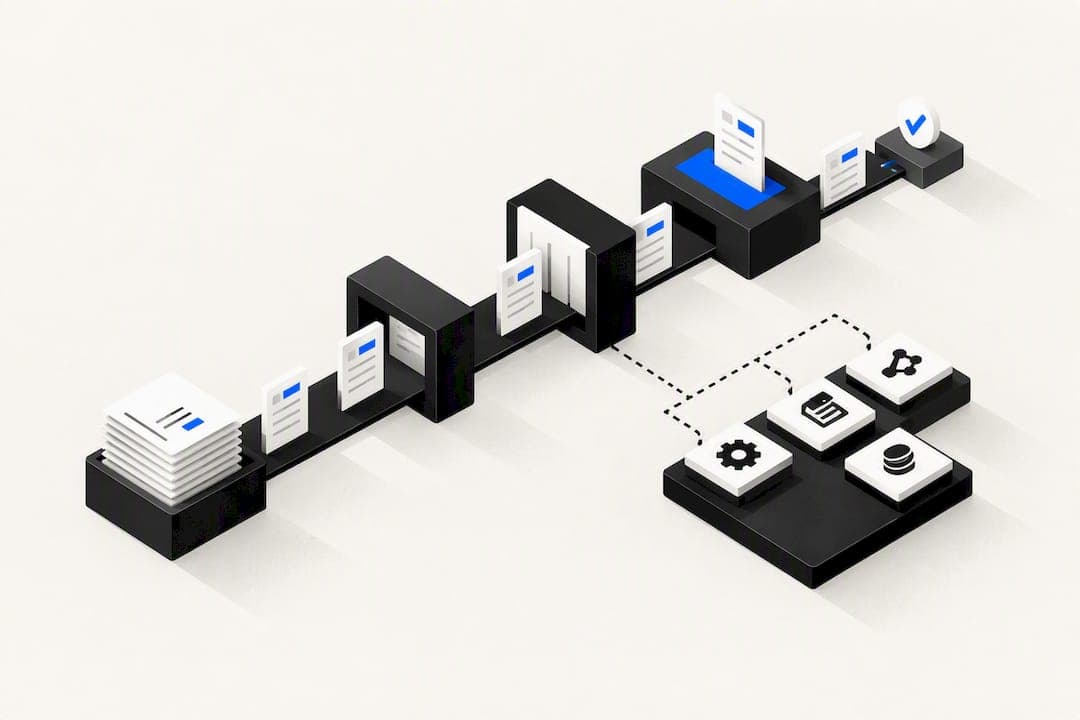
Invoice automation replaces manual data entry, paper routing and email chasing with software that captures, checks and posts invoices automatically. It cuts processing time, removes the errors that come from rekeying numbers, and gives accounts payable teams real visibility over what's owed and when. The people who feel the difference the fastest are AP clerks, finance leaders trying to close the books faster, and treasury teams managing cash flow.
TL;DR:
- Automation yields high match rates of 70 to 90 percent for purchase-order based invoices, with lower rates for businesses handling many non-PO suppliers.
- Effective exception handling is critical, as no system processes 100% of invoices automatically; the speed of resolving exceptions impacts overall efficiency.
- Integration complexity varies, with API-based connections offering real-time data exchange, while batch transfers may extend implementation timelines.
- Scope and quality of supplier onboarding influence automation success, requiring clear communication and phased rollout to prevent friction with smaller or irregular suppliers.
- Compliance with jurisdiction-specific invoicing rules, tax regulations, and data privacy requirements is essential to avoid penalties and ensure smooth cross-border processing.
Table of Contents
- What is invoice automation?
- How invoice automation works: the core workflow steps
- Key technologies behind invoice automation
- Benefits and realistic ROI: what finance teams can expect
- How to plan and implement invoice automation (practical roadmap)
- Integration and compatibility with ERPs and accounting systems
- Common pitfalls, risks and red flags to avoid
- Measuring success: KPIs and dashboards for AP after automation
- How OK Technology approaches invoice automation
- Legal and regulatory requirements across different jurisdictions
- Impact of invoice automation on vendor relationships and supplier onboarding
- Author perspective: platform versus specialist AP tool
- Getting started with invoice automation through OK Technology
- Sources
- FAQ
What is invoice automation?
Invoice automation is software that takes an invoice from arrival to payment with minimal human handling, using automated invoice processing techniques like machine learning and optical character recognition to read, validate and route each document. It replaces the version of accounts payable where someone opens an email, prints the attachment, keys the numbers into an ERP, and walks a paper folder around the office for sign off.
The scope splits into two broad categories. PO-based invoices get matched against a purchase order and goods receipt note, so the system can confirm the price, quantity and delivery all line up before anyone approves payment. Non-PO invoices, things like utility bills, subscriptions or one-off services, skip that matching step and go straight to a coding and approval workflow based on business rules.
Invoices arrive through several channels, and a competent invoice management system has to handle all of them without asking suppliers to change how they work:
- Email attachments (PDF, image, or embedded in the message body)
- Scanned paper invoices fed through a desktop or network scanner
- EDI feeds from large suppliers who transmit structured data directly
- Supplier self-service portals where vendors upload invoices and track status
Invoice automation sits inside the wider procure-to-pay chain, downstream of purchasing and upstream of payment execution. It doesn't replace your ERP or your banking rails. It sits between them, translating messy incoming documents into clean, structured data those systems can act on.
How invoice automation works: the core workflow steps
The workflow follows a consistent sequence, regardless of which vendor's software you're looking at. Understanding each stage helps you spot where a vendor's product is genuinely strong and where it's papering over gaps with manual workarounds.
- Capture and classification. The system ingests invoices from every input channel, identifies duplicates against invoices already in the system, and sorts documents by type and supplier.
- Data extraction and line-item parsing. OCR and machine learning models pull out the header fields (invoice number, date, total) and, critically, the individual line items, quantities and unit prices.
- Validation and business-rule checks. The extracted data gets checked against tax rules, currency formats, supplier master data and internal spending policies, with auto-coding suggesting the right general ledger account based on historical patterns.
- PO and GRN matching. For purchase-order invoices, the system runs two-way or three-way matching against the order and the goods receipt note, flagging anything outside tolerance for human review.
- Approval routing and posting. Invoices that pass validation move through an approval workflow built on delegated authority limits, then post automatically to the ERP, with a payment file handed off to treasury or the banking system.
Pro Tip: Before comparing vendors, pull 100 real invoices from the last quarter, including your messiest suppliers, and ask each vendor to process them live. Marketing decks show clean invoices. Your actual invoice mix rarely looks that tidy.
Exception handling deserves its own mention, because this is where most automation projects either earn their keep or quietly fail. No system matches 100% of invoices without a human touching them. Price discrepancies, missing goods receipts and unusual supplier formats all generate exceptions that need a person to resolve. The strength of an invoice approval workflow isn't measured by how few exceptions it creates. It's measured by how efficiently it surfaces and resolves the exceptions that do occur, ideally routing them to the right person automatically rather than dumping them into a shared inbox.
Key technologies behind invoice automation
Two vendors can both claim "AI-powered" invoice processing and mean very different things by it. Knowing the underlying technology helps you ask sharper questions during a demo.
OCR and document parsing comes in two flavours. Template-based OCR memorises the exact layout of a specific supplier's invoice and breaks the moment that supplier changes its format. Intelligent or "zonal" OCR uses machine learning to locate fields regardless of layout, which matters enormously once you're processing invoices from hundreds of suppliers with no consistent template.
Machine learning does more than reading text. It suggests general ledger codes based on how similar invoices were coded historically, flags anomalies like a sudden price jump from a regular supplier, and improves its own extraction accuracy over time as it sees more examples. Real-world accuracy varies with invoice complexity and supplier coverage, and vendor-claimed accuracy figures deserve a live test against your own documents before you take them at face value.
Integration technology is what connects the invoice automation software to everything else in your finance stack:
- APIs for real-time, two-way data exchange with your ERP or accounting platform
- SFTP for secure batch file transfers where real-time integration isn't available
- EDI and PEPPOL networks for structured e-invoicing with large trading partners and public-sector buyers
Security and audit trail essentials include role-based access controls, a full change history on every invoice, encrypted data storage and transmission, and permission structures that separate who can code an invoice from who can approve payment.
Benefits and realistic ROI: what finance teams can expect
The honest answer on ROI: it's substantial but not universal, and it depends heavily on your supplier mix and how much manual matching you were doing before.
Well-configured enterprise deployments report touchless capture and PO auto-match rates in the 70 to 90% range, with proportional reductions in cycle time and AP processing costs.
That range matters because it's wide. A business with mostly PO-based purchasing from a stable, small supplier base tends to land near the top of that band. A business with hundreds of ad hoc, non-PO suppliers and inconsistent invoice formats will land lower, at least in the first year.
The knock-on benefits show up across several metrics finance teams should track for a business case:
- Cycle time, from invoice receipt to approval, often compresses from weeks to days once matching and routing run automatically.
- Cost per invoice falls as manual keying and chasing time disappear, though the software itself carries a cost that needs weighing against labour savings.
- Early-payment capture improves because faster approval cycles mean invoices actually clear in time to claim supplier discounts that previously lapsed while paperwork sat in someone's tray.
- Error rates drop because data moves once, from the invoice into the system, rather than being rekeyed at multiple handoff points.
A 2025 industry trends report on accounts payable automation notes that adoption accelerates fastest when organisations pair AI-based extraction with rule-based validation and full ERP integration, rather than treating automation as a bolt-on to existing manual review steps. Payback timelines vary by organisation size and invoice volume, so a board-level business case should include your actual invoice count, current cost per invoice, and a conservative touchless-rate estimate based on your supplier mix rather than a vendor's headline figure.
How to plan and implement invoice automation (practical roadmap)
Rushing straight to vendor selection is the most common mistake finance teams make. The organisations that get this right start with their own process, not the software.
- Map your current AP workflow first. Document every input channel, every approval step, every system your invoices touch, and where delays actually happen. You can't automate what you haven't diagrammed.
- Design a narrow pilot. Pick one supplier category or business unit and set explicit success criteria (target touchless rate, cycle time reduction) before you switch anything on.
- Configure rules, approvals and GL mappings for production. Translate your delegated authority matrix and chart of accounts into the system's rule engine, and test it against edge cases, not just clean invoices.
- Onboard suppliers deliberately. Communicate the change, offer a simple submission format, and expect a transition period where some invoices still need manual handling.
- Roll out in phases, expanding supplier coverage and invoice types once the pilot hits its targets, rather than switching every supplier over on day one.
Pro Tip: Run your pilot with a supplier category that has both an enthusiastic sponsor internally and a cooperative supplier externally. A hostile pilot group will sink a good system before it gets a fair test.
Timeline expectations vary widely by scope. A vendor case study on invoice automation implementation notes that a narrow pilot focused on key suppliers is the fastest route to measurable touchless rates and early supplier buy-in, typically faster than attempting a full-scale rollout from the start. Budget for staff time on rule configuration and testing, not just the software licence. That internal time investment gets underestimated more often than the software cost does.
Integration and compatibility with ERPs and accounting systems
Integration effort is usually the single biggest variable in how long an implementation actually takes, more than the invoice automation software itself.
Three integration patterns cover most deployments:
- API-based integration offers real-time, two-way data flow and is the standard for modern ERP platforms with open interfaces.
- Middleware integration sits between the invoice automation tool and an older ERP that doesn't support direct API connections.
- Batch file transfer, usually via SFTP, works when real-time posting isn't necessary and a nightly sync is acceptable.
Common ERP-related considerations include how the two systems handle multi-entity structures, how tax codes map between platforms, and whether the invoice tool posts directly or generates a file for manual import. HighRadius documentation on invoice processing integration points to APIs or secure file transfers as the standard connection methods with major ERPs, alongside audit trails and posting verification as non-negotiable requirements before go-live.
Data mapping deserves careful attention before cutover: chart of accounts, tax jurisdictions, and supplier master records all need to align between systems, or you'll spend months reconciling mismatches. Run a parallel test period, processing invoices through both the old and new system simultaneously, before fully retiring your manual process.
Common pitfalls, risks and red flags to avoid
Vendors sell certainty. Reality is messier, and the gap between the two causes most of the frustration finance teams report after go-live.
- Absolute automation claims deserve scepticism. No system processes every invoice without human review, and exception handling capability matters more than a headline touchless percentage.
- Supplier-coverage gaps get missed in planning. Long-tail suppliers with irregular formats or paper-only invoicing can quietly stay manual long after go-live, undermining your overall automation rate.
- Integration customisation causes budget and timeline creep when a "standard" ERP connector turns out to need custom development for your specific configuration.
- Weak audit trails and compliance controls surface as a problem months later, usually during an external audit, not during implementation.
Real-world accuracy and automation rates vary by supplier mix and document quality, which is why live trials with your own sample invoices matter more than any vendor's stated accuracy figure.
Measuring success: KPIs and dashboards for AP after automation
Five metrics tell you whether the system is actually working: cycle time (receipt to payment), cost per invoice, touchless processing rate, exception rate, and early-payment discount capture. Track these monthly at minimum, weekly during the first quarter after go-live, when rule tuning matters most.
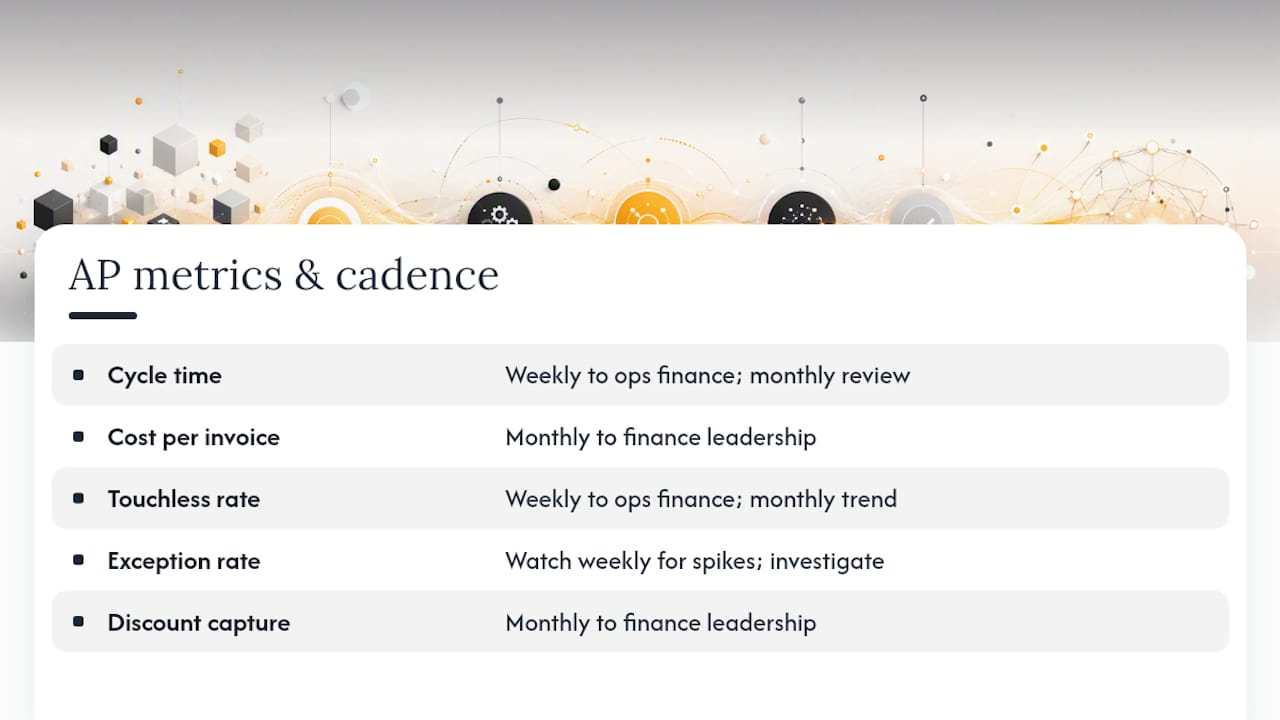
Report cycle time and touchless rate to operational finance managers weekly. Reserve cost-per-invoice and discount-capture trends for monthly reviews with finance leadership, since those numbers move slowly and benefit from a longer view. When exception rates spike for a particular supplier or invoice type, that's your signal to revisit the matching rules or business logic rather than assuming the software has failed.
How OK Technology approaches invoice automation
Most invoice automation tools solve one problem well and leave finance teams stitching together separate systems for CRM, project tracking and billing. OK Technology takes a different starting point: a single platform consolidating sales, marketing and finance operations, including automated billing, rather than another point solution to manage alongside everything else.
That consolidation is the whole pitch. Businesses juggling disparate tools for invoicing, CRM and project management lose real time to switching between systems and reconciling data that lives in three places at once, and OK Technology's integrated approach targets exactly that overhead, with a stated saving of over 9 hours a week for teams that consolidate onto one ecosystem.
What sets some pricing apart is the pay-per-action model: no tiered subscription forcing you to pay for capacity you don't use. The model charges for the invoices created, the invoices sent, and specific actions the AP process actually generates. For a business that has outgrown a legacy system but doesn't want to commit to another rigid licence structure, that flexibility is worth weighing seriously.
Legal and regulatory requirements across different jurisdictions
Invoice automation doesn't operate in a regulatory vacuum, and the rules differ sharply depending on where your business and your suppliers sit. E-invoicing mandates are the clearest example: several jurisdictions now require structured electronic invoices routed through government-approved networks rather than PDF attachments, with the PEPPOL framework serving as the technical backbone for many of these systems across Europe and beyond.
Tax compliance requirements vary by country too. Value-added tax and goods-and-services-tax rules dictate how tax fields must be captured and reported, and some jurisdictions require real-time or near-real-time reporting of invoice data to tax authorities rather than periodic filing. An invoice automation system operating across multiple countries needs to handle these differences without forcing a single rigid format onto every invoice.
Data residency and privacy rules add another layer. Invoice data typically contains supplier bank details, contact information and sometimes personal data tied to sole traders or freelance suppliers, which can trigger data protection obligations depending on where that data is stored and processed.
None of this is optional configuration. Getting it wrong risks penalties, rejected invoices at the tax authority level, or audit findings that could have been avoided with the right setup from the start. Any business operating across borders should treat jurisdiction-specific compliance as a core selection criterion, not an afterthought handled after go-live, and should verify current requirements with a tax adviser or the relevant tax authority for each country involved rather than relying on a vendor's general compliance claims.
Impact of invoice automation on vendor relationships and supplier onboarding
Suppliers notice when a customer automates accounts payable, and the effect on the relationship can go either way depending on how the transition is handled.
Done well, automation improves supplier relationships measurably. Faster approval cycles mean suppliers get paid sooner, and portal-based visibility means they can check invoice status themselves instead of phoning your AP team to ask where their payment is. That reduction in status-chasing calls frees up AP staff time and reduces friction that had nothing to do with the actual payment terms.
Done badly, automation creates new friction. A poorly communicated switch to a supplier portal, or a rigid system that rejects any invoice deviating slightly from an expected format, pushes work back onto suppliers who now have to resubmit or chase clarification. Long-tail suppliers, particularly smaller ones without dedicated finance staff, often struggle most with new submission requirements.
The onboarding approach matters as much as the software. Communicate changes well before go-live, offer more than one submission channel during the transition period, and expect that your largest, most sophisticated suppliers will adapt fastest while smaller ones need more support. Some businesses tier their supplier onboarding, prioritising high-volume suppliers for full automation first and leaving lower-volume, irregular suppliers on a manual or semi-manual track longer. That's a pragmatic sequencing choice, not a failure of the automation project.
Author perspective: platform versus specialist AP tool
A specialist AP tool wins when invoice volume is your only real pain point and everything else in your finance stack already works. An integrated platform earns its keep once tool sprawl itself becomes the cost, when your CRM, billing and project data live in three disconnected systems that nobody fully trusts. Ask yourself one question before choosing: is the problem invoices, or is it the fact that nothing in your business talks to anything else?
— Paolo
Getting started with invoice automation through OK Technology
If tool sprawl is the real issue behind your invoicing headaches, the fix isn't another standalone AP product. It's consolidating billing into the same ecosystem as your CRM, project management and finance operations, so invoice data doesn't need reconciling across three separate logins.
OK Technology's pay-per-action pricing means you pay 0.03 EUR per invoice created and 0.02 EUR per invoice sent (plus a small per-megabyte fee), rather than a flat monthly subscription sized for capacity you might not use. That structure suits a business that has outgrown spreadsheets and disconnected tools but isn't ready to commit to a rigid annual licence. Businesses that need help mapping their existing AP workflow into the platform can also book hourly business consulting or technical help, priced separately.
Review the full pricing breakdown for every action type, from CRM leads to document storage, and see how the costs compare against what you currently spend across separate invoicing, CRM and project tools. From there, the next step is straightforward: get in touch to scope a pilot around your own invoice volume and supplier mix.
Sources
For deeper technical grounding, IBM's explainer on automated invoice processing covers the OCR and machine learning mechanics in more depth. The IFOL Accounts Payable Automation trends report offers current adoption benchmarking, and Blue Prism's invoice automation guide provides a solid vendor-agnostic overview of benefits and process design.
- What is automated invoice processing?
- IFOL Accounts Payable Automation trends 2025 (ACARP)
- Streamline AP & Invoicing Process with Invoice Processing Software
FAQ
Is there a way to automate invoices?
Yes. Invoice automation software captures invoices from email, scanned paper, EDI feeds or supplier portals, extracts the data automatically, and routes them through validation and approval without manual keying. Platforms like OK Technology build this into a wider finance and billing ecosystem rather than as a standalone tool.
Can ChatGPT generate an invoice?
A general-purpose AI chatbot can draft the text and layout of a simple invoice if you supply the details, but it won't validate against a purchase order, apply your approval rules, or post to your accounting system. That gap is exactly what dedicated invoice automation software and invoice management systems are built to close.
How can I automate invoices in Excel?
Excel supports basic automation through templates, formulas and macros that generate invoice numbers or calculate totals automatically, but it has no built-in matching, approval routing or audit trail. It works for very low invoice volumes; beyond a few dozen invoices a month, dedicated invoice processing software becomes far more reliable.
Can AI do my invoices?
AI handles the repetitive parts well, reading invoice data, suggesting general ledger codes and flagging anomalies, but real-world accuracy depends on invoice variance and supplier coverage, so human review of exceptions still matters. Treat AI as the engine behind automatic payment reminders and data extraction, not a full replacement for AP judgement.
What does OK Technology charge for invoice automation?
OK Technology charges 0.03 EUR per invoice created and 0.02 EUR per invoice sent, plus a small per-megabyte fee, rather than a flat subscription. Full details for every billed action are listed on the pricing page.