
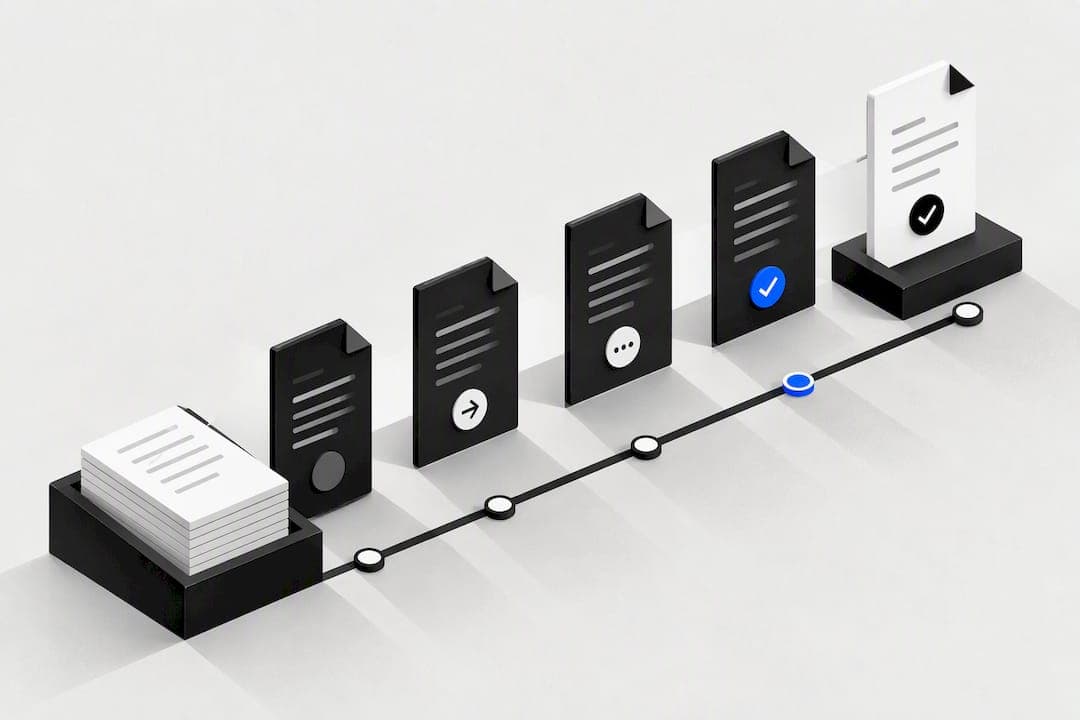
A document approval workflow routes documents through defined reviewers and records sign-offs so teams publish accurate, auditable versions faster. It replaces email chains and guesswork with clear states, assigned roles and a logged history of every decision. Done well, it speeds up review, fixes accountability on named people, and gives you evidence for any later audit. The sections below cover how to design, pilot and run one.
TL;DR:
- Reserve full workflows for documents with financial, legal, or operational risk; routine files that rarely change can use a lighter review or no review.
- Separate authorship from approval, define states and permissions before building, and route around absences with a deputy or timed escalation.
- Use sequential routing for contracts and policies; parallel review is faster but needs a disagreement rule, while invoices under £500 can be automatically approved.
- Pilot one document type with a small group and one or two approval steps, then track time in stage and rework before wider rollout.
- Power Automate limits each flow to 50 create requests and 500 other approval requests per 60 seconds; timestamps use UTC for audit reconciliation.
Table of Contents
- What a document approval workflow is, and when to use one
- Core components and roles to design before automating
- Common approval patterns and their trade-offs
- Step-by-step roadmap to design, pilot and deploy an approval workflow
- Tools and integrations: where the file lives and how triggers work
- Version control and audit trail: what to log and how to retain evidence
- Testing, monitoring and continuous improvement for approval workflows
- Best practices for handling exceptions and rejections within the document approval workflow
- Security and compliance considerations in document approval processes
- User training and change management strategies to ensure adoption
- Automation opportunities using AI or machine learning for intelligent routing
- Publisher perspective: why consolidation beats another point solution
- How OK Technology helps you run approval workflows without the tool sprawl
- FAQ
- Sources
What a document approval workflow is, and when to use one
A document approval workflow is a defined sequence of steps that moves a document from draft to a final, locked state, with named people responsible for reviewing and signing off at each stage. It differs from general process automation because the point is not just speed: it is producing a reliable record of who approved what, and when.
You need one whenever a document carries financial, legal or operational weight, not for every file that changes hands. Typical candidates include:
- Contracts and legal agreements that bind the organisation
- Invoices, quotes and purchase orders tied to spending controls
- Policy documents, SOPs and compliance records
- Marketing assets or public communications that need sign-off before release
- Technical specifications that affect delivery or safety
If a document rarely changes or carries no risk if wrong, a lighter review process, or none, usually serves you better than a full workflow.
Core components and roles to design before automating
Before you build anything, decide the structure the automation will enforce. Skipping this step is the most common reason approval tools end up ignored.
- States: define draft, review, approved, locked and retired, and decide who can move a document between each one.
- Roles: separate the author from the approver, and the approver from whoever can edit a locked, approved version.
- Routing: set who reviews first, who reviews next, and what happens if someone is unavailable.
- Service levels: attach a response window to each stage, with an escalation path if it is missed.
- Notifications: decide what triggers an alert, to whom, and through which channel.
- Audit log: fix what gets recorded at every state change before the first document goes through.
Separation of duties matters more than most teams expect. If the person who drafts a contract can also approve it, the workflow records a decision, not a review.
Pro Tip: Draft your permission matrix on paper first: list every role against every state and mark who can view, edit, approve or unlock. Build the automation only once that grid is settled.
Common approval patterns and their trade-offs
Most document approval workflows follow one of three patterns, and the right choice depends on how much risk the document carries and how fast you need a decision.
- Sequential approval sends the document to one reviewer at a time, in order. It suits contracts and policy documents where each approver needs to see the prior sign-off before adding their own, and Power Automate's approval flows support this pattern natively alongside parallel routing.
- Parallel (concurrent) approval sends the document to several reviewers at once and reconciles their responses, which is faster but needs a clear rule for what happens if reviewers disagree, such as requiring unanimous approval or a named tie-breaker.
- Conditional pre-approval skips a review stage automatically when a document meets a defined threshold, for example auto-approving invoices under £500 and routing anything above that to a manager.
Choosing wrong in either direction costs you: too much sequencing slows low-risk documents, too much parallel or pre-approval routing weakens oversight on the documents that need it most.
Step-by-step roadmap to design, pilot and deploy an approval workflow
Build the workflow in order, and resist the urge to automate before the process itself is settled.
- Map the current process. Write down every step a document actually goes through today, including the informal ones, and mark where delays happen.
- Set states and the role matrix. Fix your draft to retired states and confirm who holds each role, keeping document creation and approval strictly separate.
- Define SLAs and escalation. Attach a time limit to each review stage and decide who gets notified if it slips, and through which channel.
- Write notification templates. Keep them short: what needs action, by whom, by when, and a direct link to the document.
- Build minimal viable automation. Automate the smallest version that enforces your states and logs decisions, rather than a fully featured flow from day one.
- Pilot on a narrow document set. Run it on one document type with a small group before rolling it out more widely.
- Collect metrics and iterate. Track time-in-stage and rework rate from the pilot, then adjust routing or SLAs before expanding.
Pro Tip: Pilot with one or two approval steps rather than a full multi-stage flow. A minimal flow proves your routing and SLA logic work before you add complexity.
Most teams that skip the mapping step end up automating a broken process faster, not a better one.
Tools and integrations: where the file lives and how triggers work
Pick one authoritative location for the document and keep every version, comment and approval decision inside it rather than scattered across email and personal drives. SharePoint's content approval feature holds documents in a pending state, invisible to read-only users, until an authorised approver marks them approved, and pairs this with major and minor versioning so the full history stays attached to the file.
Common triggers for starting an approval include:
- A form submission, such as a request raised through Microsoft Forms
- A new or changed item in a document library or list
- A file upload to a watched folder
- A direct call from another system through an API
Notifications typically go by email or chat, and actionable approvals (where a reviewer can approve directly from the notification) save a step, though some platforms restrict this for guest users rather than internal staff, per the advanced approvals connector documentation.
Before you rely on a flow for a business-critical document type, check the operational limits. Power Automate caps approval requests at 50 create requests and 500 non-create requests per 60 seconds per flow, and approval timestamps are shown in UTC, which matters when you are reconciling logs across time zones.
Version control and audit trail: what to log and how to retain evidence
An approval workflow's main value is a defensible record of who approved which version and when, not a guarantee that the content itself is correct, according to Zipboard's guide to document approval workflows. Design the evidence chain before you worry about anything else.
At minimum, every state change should log:
- The document ID and version number
- The prior state and the new state
- The identity of the person who made the change
- The timestamp of the action
- The rationale, where a rejection or override is involved
Automatic versioning paired with long retention lets you trace exactly what changed, when, and by whom, which Proton's guide to document version control notes is the standard a well-run audit expects, citing retention periods of up to ten years as an example of a long-term policy.
Keep locked, approved versions protected so they cannot be edited without a logged, authorised unlock event, and keep that history inside one authoritative system. Splitting it across email threads and personal drives is the single most common reason audit trails fail to hold up, and for documents under heavy compliance scrutiny, append-only or tamper-evident logging is worth the extra setup.
Testing, monitoring and continuous improvement for approval workflows
Test the workflow the same way you would test any system that handles money or compliance, not just the happy path.
- Run a document through the standard approval path and confirm the log captures every expected field.
- Trigger a rejection and confirm the document returns to draft with the rationale recorded.
- Test the pre-approval threshold at, just below, and just above the cutoff.
- Check attachment handling and confirm large files or unusual formats do not silently fail.
- Push volume through the flow to see how it behaves near throttling limits.
Once live, track time-in-stage, rework rate and the count of outstanding approvals, and audit permissions and orphaned requests on a regular schedule. Feedback from these audits usually points to the same fix: cut a review stage that is not adding oversight.
Best practices for handling exceptions and rejections within the document approval workflow
Every workflow needs a defined path for what happens when a document is rejected, not just one for when it is approved. Build the rejection path with the same care as the approval path, because this is where most workflows quietly break down and revert to email.
When a reviewer rejects a document, the workflow should return it to draft automatically, record the rationale against that decision, and notify the author directly rather than leaving them to check a dashboard. A rejection without a recorded reason is close to useless later, when someone asks why a document took three rounds to approve.
Build in a defined escalation path for documents that stall, rather than letting them sit indefinitely in one reviewer's queue. A named deputy approver, or a time-based escalation to a manager, keeps a single unavailable reviewer from blocking the whole flow.
Handle true exceptions, such as a document that needs to bypass a normal stage for a genuine emergency, through a logged override rather than an informal workaround. The override itself should be recorded with who authorised it and why, so an audit years later can still explain the gap.
Finally, review rejected documents periodically as a group. A pattern of rejections at the same stage usually means the earlier stage is missing information the reviewer needs, not that the reviewer is being difficult.
Security and compliance considerations in document approval processes
Access control matters as much as the approval logic itself. Permission matrices should sit at the storage layer, not only inside the workflow interface, so a locked, approved document cannot be edited by someone who simply has file access, even if they never touch the approval tool.
For regulated or financial documents, design the full state machine, draft, review, approved, locked, retired, alongside a clear permission matrix and an evidence chain capturing document ID, version, approver identity and rationale for every decision. This structure is what keeps an approval defensible when a regulator or auditor asks for it later.

Keep the number of approval stages narrow and limited to document types that genuinely need oversight. Adding steps for the sake of thoroughness slows every team member down without improving the assurance an auditor actually checks for.
Where compliance obligations are strict, append-only or tamper-evident logging is worth building in from the start, since a log that can be edited after the fact carries little evidential weight. Our guide to audit-ready CRM data controls covers related retention and permission practices if you are extending these controls into your customer data as well.
User training and change management strategies to ensure adoption
A workflow that works on paper still fails if nobody uses it correctly, so training needs to cover the reasoning behind each control, not just the button to click. Reviewers who understand why separation of duties exists are far less likely to approve their own drafts under a shared login out of convenience.
Roll out training role by role rather than as one session for everyone. Authors need to know how to submit and what information a reviewer expects; approvers need to know their SLA and how to escalate; administrators need to know how to handle an exception or unlock a locked document correctly.
Give people a short, practical path during the pilot stage, when a small group runs a narrow set of documents through the new flow before it replaces the old process. Problems surface here, while the group is small enough to fix them without disrupting daily work.
Keep the old process available only briefly during the transition, and communicate a firm cut-off date. A workflow that coexists indefinitely with the email chain it was meant to replace rarely fully replaces it.
Automation opportunities using AI or machine learning for intelligent routing
Automated routing can go beyond fixed rules once you have enough historical approval data to work with. Rather than every document following the same sequential path, a routing layer can direct low-risk documents straight to a single approver while flagging unusual or high-value ones for extra review, based on patterns in past decisions.
Approval prediction, estimating how likely a document is to be approved based on similar past submissions, can help flag documents that are likely to stall or get rejected before they reach a reviewer, giving authors a chance to fix obvious issues earlier. This works best as a supplement to your existing rules, not a replacement for human sign-off on anything that carries real risk.
The same logic extends to document matching and compliance checking: automatically flagging missing fields, mismatched figures or incomplete attachments before a document reaches the first reviewer removes a common source of rejection and rework. Westcode's workflow-first automation playbook illustrates how this kind of pattern plays out in practice across property management processes, and the same principle, automate the routine checks, keep a person accountable for the judgement calls, applies directly to document approvals.
Treat any AI-assisted routing as advisory until you have enough pilot data to trust it on your own documents. A prediction that saves a reviewer five minutes is useful; a prediction that replaces their judgement on a contract is a different decision entirely.

Publisher perspective: why consolidation beats another point solution
Most approval workflow failures trace back to one root cause: the document, the approval tool, the notification system and the billing record all live in different places. Every handoff between those systems is a place for the audit trail to fracture.
A single system that holds document storage, workflow states and billing together removes that fracture point by design, because there is nothing to reconcile across tools. That is the case for treating document approval as one part of a wider operational stack rather than a standalone tool bolted onto existing software.
The organisations that get this right tend to be the ones who stopped treating approval as a separate project and started treating it as one more consolidated workflow.
— Paolo
How OK Technology helps you run approval workflows without the tool sprawl
We built our platform around the idea that document storage, workflow automation and billing should sit in one place, not three. When your approval workflow, invoicing and CRM all run through the same system, there is one audit trail to check, not several to reconcile.
Our pricing model means you pay for what you actually use: documents stored, invoices created, contracts generated, each billed individually rather than bundled into a tier you don't need. If you are already running invoice approvals, our invoice automation roadmap walks through how pay-per-action billing applies to AP workflows specifically, and our document management pilot guide sets out a short pilot plan if you want to start small.
If you want to see how this fits your own approval process, book a call or check current rates on our pricing page.
FAQ
What is an approval workflow?
An approval workflow is a defined sequence of steps that moves a document, request or task from submission to a final decision, with named reviewers responsible for signing off at each stage. It records who approved what and when, which gives you an auditable history rather than an informal exchange of messages.
What is a SharePoint document approval workflow?
A SharePoint document approval workflow uses the platform's built-in content approval feature, which keeps a document in a pending state, hidden from read-only users, until an authorised approver marks it as approved. It works alongside major and minor versioning, so the approval decision and the version history sit together in one place.
Does Microsoft Forms have an approval workflow?
Microsoft Forms does not run approvals on its own, but a form submission can trigger an approval flow built in Power Automate, which supports both sequential and parallel routing. The form captures the request, and the connected flow handles reviewer assignment, notifications and logging.
What is the difference between a workflow and an approval process?
A workflow is the broader sequence of steps a document or task moves through, which can include drafting, editing and distribution as well as review. An approval process is one specific part of that workflow, focused narrowly on getting a named person to review and sign off before the document moves to its next state.
How do I test a document approval workflow before rolling it out?
Test the standard approval path, a rejection path, and any pre-approval threshold at its exact cutoff, along with attachment handling and behaviour under higher volume. Checking these cases, including documented throttling limits where they apply, before a full rollout catches most failures while the affected group is still small.
Sources
- Create and test an approval workflow with Power Automate
- Plan document versioning, content approval and check out controls in SharePoint
- Document version control: a guide for businesses | Proton