
For most small businesses, a unified CRM platform with native email marketing beats stitching together separate tools, because one customer record makes automation easier to build and cheaper to maintain. The rest of this guide covers how to evaluate vendors, what features actually matter, and the migration steps that protect your sender reputation when you switch.
TL;DR:
- Small businesses should prioritize unified CRM platforms with native email marketing to reduce manual data reconciliation and automate customer interactions more effectively.
- Key features to consider include CRM-driven segmentation, personalized templates, automation workflows, deliverability infrastructure, and two-way inbox integration to ensure high campaign performance.
- Testing automation in real-time with actual data during demos can reveal integration gaps that might cause issues during busy periods, especially if vendor support or authentication procedures are unclear.
- Cost structures vary widely, with per-contact, per-user, per-send, or tiered pricing; businesses must assess their volume patterns to choose the most predictable and cost-effective model.
- Migrating requires thorough contact list auditing, proper domain authentication, gradual warming, and staged automation testing to protect delivery reputation and ensure data accuracy.
Table of Contents
- What does crm with email marketing actually mean?
- Core features to expect from an integrated CRM and email tool
- How do you choose the right CRM email platform?
- What does CRM and email marketing pricing usually look like?
- How do you migrate to a CRM with integrated email marketing?
- Author expertise and what the evidence actually shows
- When a unified platform is the better long term choice
- Try OK Technology's pay-per-action platform for CRM and email
- Sources
- FAQ
What does crm with email marketing actually mean?
A CRM with email marketing keeps your contact records, deal history, and campaign sends in one database rather than syncing two separate systems. When someone replies to a newsletter, that reply shows up against their contact record automatically, instead of living in a separate email tool that your sales team never opens.
Three broad routes exist, and picking between them is mostly about how much complexity your team can handle.
- Unified platform. CRM, email, and often billing or project tools live under one login, with one shared contact database. This suits solo founders and small teams who want fewer logins and less reconciliation work.
- CRM-first with native email. The CRM is the primary system of record, and email marketing is a bolt-on module inside it. This suits sales-led businesses where email supports deals rather than driving standalone campaigns.
- CRM plus best-of-breed email tool, connected by integration. You run a dedicated email marketing platform alongside your CRM, synced via native connector or Zapier-style middleware. This suits marketing teams running heavy campaign volume who need advanced segmentation the CRM's own email module can't match.
None of these routes is universally correct, and vendor roundups that walk through CRM options with email built in tend to gloss over this trade-off entirely, presenting a single "best" list instead of matching the tool to the business type, as seen in comparison round-ups such as EmailToolTester's.
A solo consultant sending a monthly update to 200 clients doesn't need the segmentation depth of a dedicated email platform. A ten-person agency running weekly nurture sequences across three client segments probably does. And a five-person team that has outgrown spreadsheets but still tracks deals in a shared inbox will get the fastest win from a unified platform, because the integration work of connecting two separate systems disappears entirely.
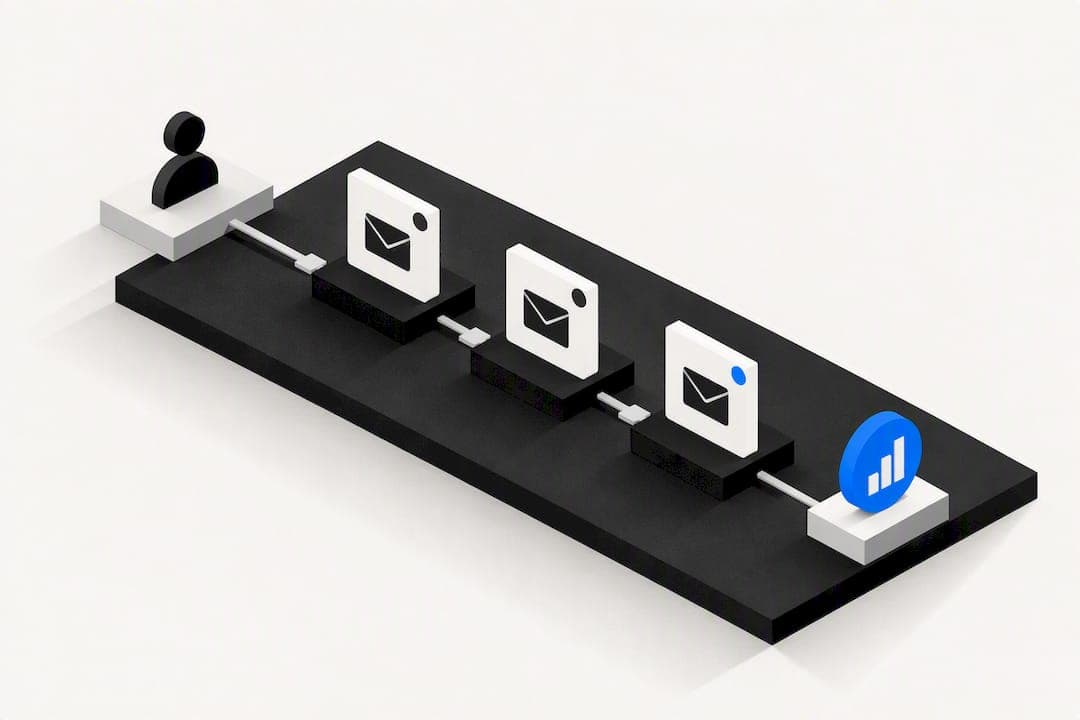
The fastest way to test this in a demo is to ask the vendor to build one real automation live, in front of you, using your actual data. Request: a new lead added by form submission, tagged by source, and dropped into a three-email sequence with a two-day delay between sends. If the vendor needs to leave the call to configure it, or if it requires a separate integration tool to make the CRM data trigger the email send, you've just seen the seam between two disconnected systems. That seam is exactly where automations break later, usually during a busy month when nobody notices until a client complains they never got a follow-up.
Core features to expect from an integrated CRM and email tool
Feature lists across CRM review sites vary in wording, but the substance converges on the same seven capabilities. G2's CRM category pages, which aggregate buyer feedback across dozens of platforms, consistently show ease of use and integration stability as the two purchase drivers buyers rank highest, ahead of feature breadth. That's worth remembering before you get seduced by a long feature checklist in a sales deck.
- Segmentation and CRM-driven lists. Your email audience should build itself from CRM fields (deal stage, last purchase, industry, engagement score) rather than requiring you to export and re-upload static lists every time you want to run a campaign.
- Personalisation tokens and templates. Beyond inserting a first name, look for conditional content blocks that change based on CRM data, such as showing a different offer to existing customers than to new leads.
- Automation workflows and triggers. Sequences should fire off CRM events, not just email opens. A deal moving to "negotiation" should be able to trigger a different email than a form fill.
- Deliverability infrastructure. This means SPF, DKIM, and DMARC authentication, plus a structured warm-up process for new sending domains. Vendor documentation on this workflow, such as AutomateNexus CRM's campaign docs, lays out the authentication sequence clearly, and it's a fair benchmark for what any serious platform should walk you through.
- Two-way inbox integration. Replies, bounces, and unsubscribes should log automatically against the contact record, the way SuiteCRM's email module associates inbound messages with existing records rather than leaving them stranded in a generic inbox.
- Analytics beyond opens and clicks. Click-to-open rate (CTOR) tells you whether your subject line or your content is the weak link. Revenue attribution, where a sale is traced back to the campaign that generated the lead, is the metric that actually justifies your email spend to a business owner who doesn't care about vanity metrics.
- APIs and webhooks. Even a platform that covers everything today will eventually need to talk to an accounting tool, a booking system, or a custom form. Open APIs prevent a second migration two years from now.
Pro Tip: Ask to see click-to-open rate broken out separately from open rate in the reporting dashboard during any demo. A platform that only reports raw opens and clicks is hiding the metric that actually tells you whether your content works, because open rate is skewed heavily by inbox previews and image blocking on most mail clients now.
Deliverability deserves particular attention because it's the feature most often skipped in sales demos, and the one most likely to sink a campaign silently. A platform can have beautiful templates and clever automation, but if your domain isn't authenticated correctly, a meaningful share of your emails land in spam without any warning in your dashboard. Ask specifically how the platform handles domain authentication for new senders, not just whether it supports SPF and DKIM as a checkbox feature.
How do you choose the right CRM email platform?
Choosing well comes down to testing against your actual workflow, not comparing feature lists on a spec sheet. Every vendor will claim to support automation, segmentation, and reporting. The differences show up in how well those things work together and how much friction your team hits doing routine tasks.
Run every shortlisted vendor through the same seven criteria:
- Functionality match. Does it support the specific automation types you already run, such as abandoned-cart follow-ups or post-purchase sequences, without needing a third-party add-on?
- Deliverability track record. Ask directly what percentage of the vendor's customer base uses dedicated IP addresses versus shared sending pools, and how the platform manages sender reputation on shared infrastructure.
- Data hygiene tools. Does the system flag duplicate contacts automatically, or is deduplication a manual export-and-merge job?
- Automation depth. Can a workflow branch based on multiple conditions (opened email AND visited pricing page), or only a single trigger at a time?
- Reporting and export. Can you export raw campaign data to a spreadsheet or BI tool, or are you locked into the vendor's own dashboard views?
- Security and compliance posture. Where is customer data stored, and does the vendor support the consent and unsubscribe mechanics required under GDPR or similar regimes in your market?
- Pricing model transparency. Is the cost structure per contact, per user, per send, or a blend, and does it scale predictably as your list grows?
During a trial, request write access to build one real workflow yourself rather than watching a scripted demo. Ask the vendor's sales rep three direct questions: What happens to my data if I cancel, can I export it in a usable format? What's the actual limit before I'm bumped to the next pricing tier, and is that limit contacts, sends, or users? And can I speak to support before I buy, not after?
Watch for two red flags in particular. If a vendor is vague about deliverability numbers or redirects the question to "it depends," they likely don't monitor it closely for their own customer base. And if the trial account has features artificially disabled that aren't clearly marked as premium, you're being shown a demo environment rather than the real product, which makes it hard to judge how the tool behaves under your actual data volume.
Pricing model flexibility is itself a negotiation lever. If a vendor's standard tiers don't fit your usage pattern (say, you send rarely but hold a large contact list), ask whether they offer a usage-based or pay-per-action alternative instead of forcing you into a tier built around someone else's typical customer.
What does CRM and email marketing pricing usually look like?
Costs generally fall into four structures, and knowing which one you're being quoted matters more than the headline number, because the same monthly figure can mean wildly different totals depending on how your business actually uses the tool.
- Per-user pricing charges by seat, which suits teams where everyone needs full CRM access but can become expensive fast as headcount grows.
- Per-contact pricing scales with your database size, which rewards a small, clean list but penalises businesses that import large historical contact lists they rarely email.
- Per-send or pay-per-action pricing charges for the specific action taken, whether that's a lead added, an email sent, or a document generated, which suits businesses with unpredictable or seasonal volume.
- Flat tiered pricing bundles a set of features and usage limits into fixed monthly bands, which is predictable but often forces you to overpay for capacity you don't use or upgrade a whole tier for one extra feature.
Hidden costs tend to cluster around four areas: dedicated IP addresses for high-volume senders, advanced automation or A/B testing locked behind a premium tier, per-seat charges for "viewer" accounts that should logically be free, and migration or onboarding fees that only appear once you've already committed. Ask for the full fee schedule in writing before signing anything, not just the advertised entry price.
Marketing automation remains one of the higher-return channels available to small businesses, and industry compilations on the topic back that up consistently, which is a reasonable argument for treating integrated email as core infrastructure rather than a nice-to-have layered on top of your CRM, per EmailMonday's marketing automation statistics overview.
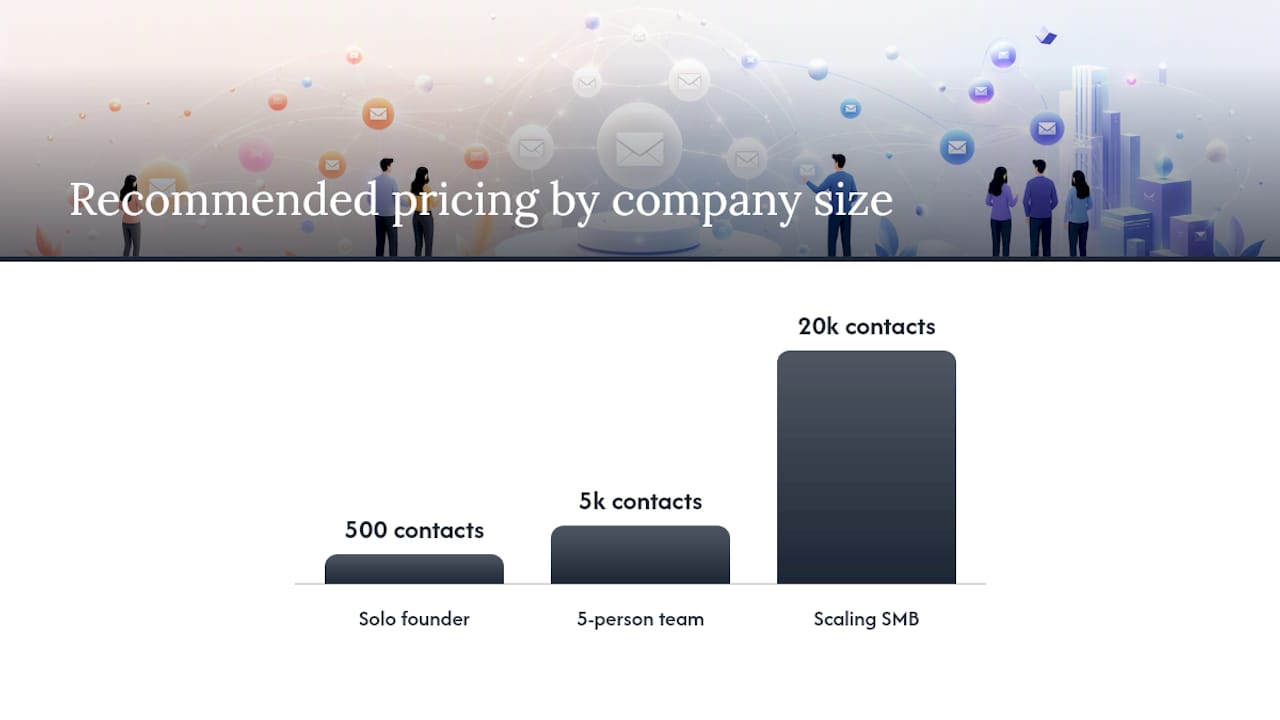
Consider three rough scenarios. A solo founder with 500 contacts and occasional monthly sends is generally best served by a low-volume, pay-per-action structure, since a flat monthly fee for capacity they'll never use is dead weight on a tight budget. A five-person team running weekly campaigns to 5,000 contacts sits in the middle ground where either a modest tiered plan or a metered model can work, and the deciding factor is usually how spiky their sending pattern is month to month. A scaling SMB with 20,000-plus contacts and daily automation activity typically needs the predictability of a negotiated tier or enterprise agreement, because per-action costs at that volume can become harder to forecast than a fixed monthly number.
How do you migrate to a CRM with integrated email marketing?
Migration risk lives almost entirely in two places: dirty contact data and deliverability reputation. Get both wrong and you'll spend your first month firefighting instead of running campaigns.
- Audit your existing contacts before you touch the new system. Pull every list from your current tools, remove duplicates, and flag anyone who never explicitly opted in. Migrating an unconsented list into a new platform is how deliverability problems start on day one.
- Authenticate your sending domain properly. Set up SPF, DKIM, and DMARC records before you send a single campaign from the new platform, following the same authentication sequence documented in typical CRM workflow guides, such as AutomateNexus CRM's setup steps. Skipping this step is the single most common reason a migration tanks open rates in the first fortnight.
- Warm up your new sending domain gradually. Start with your most engaged contacts, the people who open and click reliably, and increase volume over one to two weeks rather than blasting your full list on day one. Mailbox providers judge a new domain by its early behaviour, and a sudden volume spike from an unfamiliar sender reads as suspicious.
- Rebuild your automations one at a time, testing each before activating it live. Don't recreate every workflow simultaneously; migrate your highest-value sequence first, confirm the triggers fire correctly and the emails render properly, then move to the next.
- Reconnect your revenue attribution and reporting before you consider the migration complete. If a sale can't be traced back to the campaign that generated the lead, you've lost the one metric that proves the whole exercise was worth it.
- Run a pilot with a small segment before switching your entire list over. Move 10 to 15% of contacts first, monitor deliverability and engagement for two weeks, then roll out fully once you're confident nothing broke.
- Train your team on the new system before go-live, not after. A sales rep who doesn't know how to log a call in the new CRM will revert to spreadsheets within a week, and you'll be back to fragmented data.
Pro Tip: Keep your old email tool active in read-only mode for at least 30 days after migration. If a customer references a past email you can no longer find in the new system, you'll want the archive to check what was actually sent and when.
Author expertise and what the evidence actually shows
This guide draws on how business software platforms are built and evaluated in practice, focused specifically on the operational friction small businesses hit when CRM and email marketing live in separate systems. The recurring pattern across CRM buyer feedback, including the aggregated reviews on G2's CRM category pages, is that tool sprawl, not feature gaps, is what actually slows small teams down.
Oktechnology built its platform around that specific problem: consolidating CRM, project management, marketing, finance, and billing into a single ecosystem so businesses stop losing time and data between disconnected tools. Its positioning claims it saves businesses time by eliminating the manual reconciliation work that comes from running multiple separate systems side by side. That claim reflects the platform's own stated figures rather than independently audited data, but the underlying logic tracks with what buyer feedback across the CRM category consistently shows: integration friction, not missing features, is the recurring complaint.
The businesses that struggle most aren't the ones missing a feature. They're the ones with the right features scattered across four different logins, none of which talk to each other properly.
The pay-per-action pricing model is a notable part of the platform's positioning. Instead of charging a flat monthly tier regardless of usage, the platform charges per specific action, such as a lead generated, an email sent, or an invoice created, so a business only pays for what it actually uses. For a company that has outgrown its existing systems but doesn't want to commit to another rigid tier structure, that model directly answers the pricing transparency concern raised earlier in this guide.
When a unified platform is the better long term choice
Small teams underestimate how much time gets lost in the seams between tools, not inside any single tool itself. A CRM that's excellent at pipeline tracking and an email platform that's excellent at campaigns can still create a worse outcome together than a merely adequate unified system, simply because someone has to manually keep the two in sync every week. That reconciliation work rarely shows up on anyone's job description, which is exactly why it never gets fixed.
Separate best-of-breed tools still make sense in one circumstance: when your email volume and segmentation complexity have genuinely outgrown what any CRM's native email module can handle, and you have a dedicated person managing that complexity full-time. If nobody on your team has "email marketing" as a real part of their job, a specialised tool is a liability disguised as a feature upgrade, because sophistication nobody uses is just more surface area for something to break.
If you're piloting a unified platform, measure success by admin time saved in the first month, not campaign performance. Campaign metrics take longer to shift meaningfully, but the hours your team stops spending on data reconciliation show up almost immediately, and that number tells you whether the switch was worth it long before your first quarterly report does.
— Paolo
Try OK Technology's pay-per-action platform for CRM and email
This platform is an alternative to running separate CRM and email subscriptions: it uses pay-per-action pricing, so smaller teams sending occasional campaigns pay only for what they use. It integrates CRM, marketing automation, billing, and document storage into one system, meaning the contact record used for sales updates is the same as that used for email campaigns, without needing separate export-and-sync steps.
Every criterion covered in this guide, segmentation, automation depth, reporting, data hygiene, maps directly onto how Oktechnology structures its own feature set, and the pricing page breaks down exact costs for each action rather than hiding them behind a sales call. A CRM lead costs between €0.02 and €0.87 depending on volume, an email send costs €0.02, and a campaign send runs €1 per 1,000 recipients, figures you can check yourself on the Oktechnology pricing page before committing to anything.
If tool sprawl is already costing your team hours every week, the fastest way to see whether a unified approach fixes it is to look at the full pricing breakdown and map it against what you're currently paying across separate subscriptions.
Sources
- Marketing automation statistics overview — EmailMonday
- CRM category on G2
- Email Marketing & Campaigns | AutomateNexus CRM
FAQ
Does CRM include email marketing?
Not by default. Many CRMs are built around pipeline and contact management first, with email marketing added as a separate module, a paid add-on, or missing entirely, so it's worth checking specifically whether native email sending and automation are included before assuming they are.
Which CRM is best for email marketing?
The right choice depends on your business size and sending complexity rather than any single "best" answer: a unified platform suits small teams that want one login and one contact database, while a CRM paired with a dedicated email tool suits businesses running high-volume, highly segmented campaigns. Oktechnology's pay-per-action model is worth evaluating if you want to avoid paying for unused capacity in a fixed tier.
Is email marketing still worth it in 2026?
Yes. Industry data on marketing automation continues to show strong returns for email as a channel, particularly when it's tied directly to CRM data for segmentation and personalisation rather than run as a blind broadcast list.
Will CRM be replaced by AI?
AI is being layered into CRM platforms for tasks like lead scoring, email drafting, and automation suggestions, but it's augmenting existing CRM functions rather than replacing the underlying system of record. The core need, a single accurate database of customer and deal information, doesn't go away just because AI helps you act on it faster.