
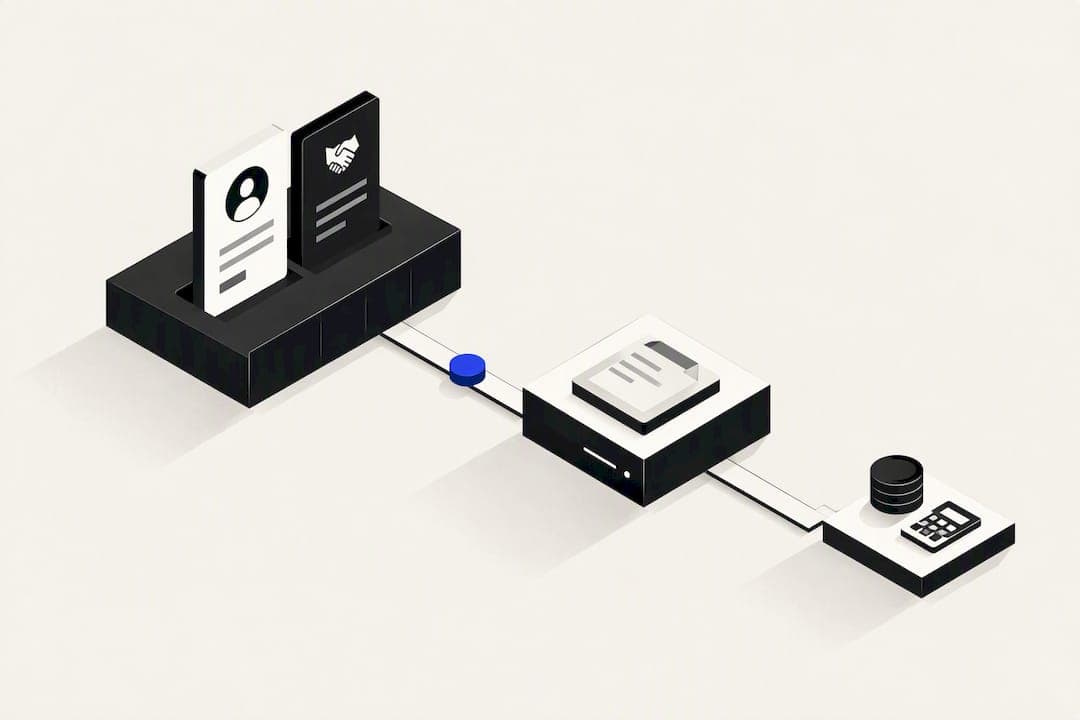
A CRM with billing suits your business when you send regular invoices and want one system to track a deal from first contact to paid invoice. It gives you a single source of truth, cuts duplicate data entry, and speeds up payment collection. It suits fewer businesses when you have complex revenue recognition or multi-entity accounting needs. The sections below cover features, integration, and cost.
TL;DR:
- CRM-native billing solutions like Verastly's Ledger offer seamless quote-to-invoice workflows with quick conversion and consistent branding.
- Complex revenue recognition or multi-entity accounting still requires dedicated platforms and proper GL mapping, especially for deferred revenue and multi-jurisdiction invoicing.
- Cost factors such as invoice volume, stored payment methods, and automation tiers significantly influence monthly expenses, with some tools offering free tiers for low volume.
- Proper integration mandates upfront agreement on data mapping, a unidirectional flow, and thorough testing to avoid reconciliation issues and billing disputes.
- Consolidated platforms like OK Technology reduce tool sprawl by combining CRM, billing, and marketing, with usage-based pricing appealing to growing businesses.
Table of Contents
- What a CRM with billing actually is
- Primary benefits for small and medium businesses
- Key invoicing and billing features to prioritise in a CRM
- How CRM billing should integrate with accounting or ERP
- Implementation checklist: governance, setup and testing
- How pricing works and which cost factors actually matter
- Publisher perspective: how a consolidated platform works in practice
- Security and compliance considerations for billing data in a CRM
- Common challenges and pitfalls with CRM billing
- Comparing top CRM billing solutions on the market
- How CRM billing reduces friction for customers
- Which route actually fits your business
- OK Technology: exploring a consolidated CRM and billing approach
- Sources
- FAQ
What a CRM with billing actually is
A CRM with billing means invoicing, quotes, and payment collection live inside the same system that tracks your contacts and deals. This differs from standalone invoicing software, which handles billing on its own and needs manual data transfer to your CRM and accounting software.
Some platforms build billing natively into the CRM. Others connect a separate billing tool through an integration, so data moves automatically but still lives in two places. Verastly's Ledger is an example of the native approach: quotes, invoices, recurring billing, autopay, and AR reporting all sit inside the CRM itself, alongside a client payment page and virtual terminal.
A typical quote-to-cash flow moves like this:
- A deal closes in the CRM and triggers a quote or invoice.
- The invoice is sent, tracked, and paid through a client portal or payment link.
- Payment data flows to accounting software for reconciliation and reporting.
CRM billing works well for straightforward, repeatable invoicing: service retainers, subscription fees, project milestones. It's less suited to businesses with multi-currency consolidation, complex revenue recognition schedules, or statutory reporting across several legal entities. In those cases, the CRM should stay focused on deals and customer records, while a dedicated billing platform and your accounting software handle the money side. Knowing which category your business falls into before you buy saves a costly rebuild later.
Primary benefits for small and medium businesses
The main gain is time. When invoicing lives inside the CRM, your team stops re-entering customer names, deal values, and contact details into a separate billing tool. One timeline, one record, fewer mistakes.
Cash flow improves too. A client portal lets customers view and pay invoices without emailing your finance team. Stored payment methods and automatic reminders (often called dunning) mean fewer overdue invoices sitting untouched.
Beyond speed, businesses tend to see:
- Fewer billing errors, because invoice data pulls directly from the deal record instead of being retyped.
- Consistent branding across quotes, invoices, and payment pages.
- Unified reporting, so sales and finance look at the same numbers instead of reconciling two systems.
Pro Tip: Run a 30-day pilot with one client segment before switching your whole invoicing process over, so you can catch mapping errors while the stakes are still low.
There's a caveat worth flagging early. Revenue recognition, especially for subscriptions with usage-based components, deferred revenue, or multi-year contracts, is rarely something a CRM's billing module handles correctly on its own. If your business recognises revenue over time rather than at the point of invoice, loop in your finance team or accountant before committing to CRM-native billing as your system of record. The CRM can still raise the invoice, but the GL entries need proper oversight.
Key invoicing and billing features to prioritise in a CRM
Not every CRM billing module is built the same way. When comparing options, prioritise features in this order:
- Invoice and quote management with one-click conversion. You should be able to turn an accepted quote into an invoice without retyping line items, and use templates that keep formatting consistent.
- Recurring billing with stored-card autopay and dunning automation. For subscription or retainer clients, the system should charge saved payment methods automatically and chase failed payments without manual follow-up.
- Payment gateway coverage, including a virtual terminal. Look for support for the card processors and bank transfer methods your customers actually use, plus the ability to take a payment over the phone or in person.
- A client portal with payment tracking. Customers should see invoice history, outstanding balances, and be able to pay directly, which reduces the "did you get my invoice" emails.
- Reporting and APIs for accounting sync. AR ageing reports, revenue by client, and an API or native connector to push data into your accounting software matter more as your invoice volume grows.
Platforms such as Verastly's Ledger bundle most of these into the CRM directly, including AR ageing dashboards and a built-in virtual terminal, which removes the need for a separate billing subscription for straightforward invoicing needs. If your business processes a high volume of one-off invoices rather than recurring billing, weight the quote-to-invoice conversion and templating features more heavily than the autopay and dunning tools, since those matter most for subscription-style revenue.
How CRM billing should integrate with accounting or ERP
The safest architecture separates responsibilities clearly. Your CRM should own deals and customer records. A billing platform, whether native to the CRM or a connected tool, should own invoice creation and payment collection. Your accounting software or ERP should own the general ledger and revenue recognition.
Integration guidance for platforms like NetSuite, Sage Intacct, SAP, Oracle, and Dynamics 365 recommends this separation specifically to avoid double posting and reconciliation headaches. Each data type has one source of truth, and handoffs between systems are defined before any data moves.
Before connecting anything, finance needs to define how invoice line items map to general ledger accounts. This GL mapping decision should happen on paper, in a spreadsheet or a mapping document, before a single integration is switched on. Skipping this step is one of the most common causes of expensive rework.
Once mapping is agreed, a few practical patterns keep the sync reliable:
- Use one-directional flows where possible: CRM to billing, billing to ERP, rather than bidirectional syncs that can create conflicting records.
- Build retry logic for failed syncs, so a temporary connection drop doesn't silently lose an invoice or payment record.
- Set a weekly reconciliation checkpoint where finance compares CRM-reported revenue against ERP-posted revenue and flags mismatches early.
This structure takes longer to set up than plugging in an API key and hoping. It's also the difference between a system your accountant trusts and one that generates a monthly reconciliation headache.
Implementation checklist: governance, setup and testing
A CRM billing rollout goes wrong most often when finance is brought in after the system is already configured. Get sign-off from finance, sales leadership, and IT before you start building.
- Confirm stakeholders and sign-off milestones. Finance approves GL mapping and tax rules, sales confirms the quote-to-invoice workflow matches how deals actually close, and IT confirms data security and access controls.
- Complete pre-deployment tasks. Map GL accounts, configure tax or VAT rules for each jurisdiction you invoice in, and onboard your payment processor with the correct settlement account.
- Configure, test, and plan for rollback. Run a parallel test period where invoices generate in both the old and new system, compare outputs line by line, and agree in advance what triggers a rollback if numbers don't match.
- Train users before cutover. Sales teams need to know how invoicing changes their existing workflow, and finance needs a clear escalation path for exceptions.
Pro Tip: Keep your old invoicing system live in read-only mode for at least one full billing cycle after cutover, so you have a reference point if a customer disputes a historical invoice.
Set a firm cutover date only once a full test cycle has produced matching totals in both systems. Rushing this step is the single biggest cause of billing disputes in the first month after launch.
How pricing works and which cost factors actually matter
CRM billing tools generally price in one of two shapes: a flat monthly subscription per user or per company, or a pay-per-action model where you're charged for specific actions like sending an invoice or processing a payment.
Cost climbs with a few predictable factors:
- Invoice volume, since some platforms charge per invoice sent or per payment processed.
- Stored payment methods and autopay, which sometimes carry a separate fee on top of the base subscription.
- Automation depth, since dunning sequences, recurring billing, and reporting dashboards are often gated behind higher subscription tiers.
For very small businesses sending a handful of invoices a month, a low-cost or free standalone tool can be enough. Zoho Invoice's free tier offers unlimited invoices, recurring billing, reminders, and client portals with no monthly fee, which makes it a reasonable starting point if you don't yet need integrated CRM reporting. As invoice volume grows and you need AR data tied to customer records rather than sitting in a separate tool, the calculation shifts towards a consolidated platform, even if the per-invoice or subscription cost is higher.
Whichever model you choose, ask for the full fee schedule before signing, not just the headline subscription price. Payment processing fees, per-invoice charges, and add-on costs for portals or automation can add up faster than the base price suggests.
Publisher perspective: how a consolidated platform works in practice
Tool sprawl is a common problem: separate CRM, invoicing, project management, and marketing tools that don't talk to each other, and staff who spend hours moving data between them by hand.
OK Technology built its platform around solving that specifically, consolidating CRM, billing, project management, and marketing into one system. The company states that businesses using its consolidated platform save over 9 hours a week compared with managing disparate tools.
Rather than charging a flat subscription, OK Technology uses a pay-per-action model, so you pay for the invoices, leads, and emails you actually generate rather than a seat-based tier. This fits businesses that have outgrown a single-purpose invoicing tool but don't want to commit to a large fixed monthly cost while usage is still growing.
Security and compliance considerations for billing data in a CRM
Billing data inside a CRM carries more regulatory weight than a typical contact record, because it usually includes payment details and financial history tied to identifiable people.
If your CRM stores or processes card data directly, PCI DSS compliance applies, and the scope of that compliance depends on how the card data flows through your system. Many CRM billing tools reduce this burden by tokenising card details through a payment gateway rather than storing raw card numbers, which keeps more of the compliance burden with the gateway provider instead of your business.
For businesses handling customers in the EU or UK, GDPR applies to billing data the same way it applies to any personal data: you need a lawful basis to process it, a defined retention period, and the ability to fulfil access or deletion requests. Since invoices often contain names, addresses, and transaction histories, deleting a customer record fully sometimes conflicts with statutory recordkeeping requirements for financial documents. Get clarity from your accountant or legal adviser on how long invoice records must legally be retained in your jurisdiction before setting deletion policies.
Access controls matter as much as the technical safeguards. Not every CRM user needs to see payment details or full billing history, so role-based permissions should be set up before billing data starts flowing into the system, not after.

Common challenges and pitfalls with CRM billing
The most frequent problem is treating billing as a bolt-on rather than a proper implementation. Teams connect a payment gateway, start sending invoices, and only discover weeks later that GL mapping was never agreed with finance, leading to a backlog of manually corrected journal entries.
Duplicate customer records cause a similar headache. If sales and finance both create customer entries independently before the systems are properly linked, invoices end up split across two records, making AR reporting unreliable.
Tax and VAT misconfiguration is another common trap, particularly for businesses invoicing across multiple regions with different rates or exemption rules. Getting this wrong doesn't just create a bookkeeping mess. It can mean under-collecting tax you're legally required to charge.
Finally, businesses sometimes skip a parallel testing period and cut over directly to the new billing system. When invoice totals don't match between old and new systems after the fact, tracing the discrepancy back to its source is far harder than catching it during a proper test cycle.
The fix in each case is the same: define ownership and mapping rules before data starts moving, and test with real invoices before customers see them.
Comparing top CRM billing solutions on the market
CRM billing tools broadly fall into three categories, each with a different trade-off.
Native CRM-billing platforms, like Verastly's Ledger, build invoicing directly into the CRM. The advantage is a single system with no sync delay. The trade-off is that revenue recognition and complex accounting scenarios usually still need a proper accounting integration alongside it.
Standalone invoicing tools, such as Zoho Invoice's free tier, are low-cost and quick to set up, which suits very small businesses well. The limitation is that customer and deal data stays separate from your CRM, so reporting across sales and finance requires manual reconciliation.
PSA-style platforms that combine project delivery with billing and revenue recognition, as seen in comparative notes on Certinia's implementation and pricing approach, suit project-based businesses well but usually involve a longer implementation timeline than a simple CRM add-on.
The right choice depends less on features and more on how your revenue actually works: simple invoice-and-pay, subscription and recurring, or project-based billing with recognition schedules.
How CRM billing reduces friction for customers
Payment friction usually comes down to how many steps a customer needs to take to pay you, and how clearly they can see what they owe.
A client portal removes most of the friction by giving customers one place to view every invoice, see payment history, and pay without hunting through email threads. Stored payment methods with autopay remove the friction entirely for recurring charges, since the customer never has to take action each billing cycle.
Automated reminders, sent before an invoice is overdue rather than only after, catch a large share of late payments that happen simply because the customer forgot, not because they're disputing the charge. Combined with a virtual terminal for phone or in-person payments, a CRM with billing gives customers more ways to pay in the moment a conversation happens, rather than waiting for a follow-up email.
The net effect is fewer days between invoice sent and invoice paid, and fewer manual chase-ups for your team.
Which route actually fits your business
CRM-native billing is the right first move for most SMBs with straightforward invoicing: fixed retainers, project milestones, or simple recurring subscriptions. It's fast to set up and keeps your data in one place while you're still working out your own processes.
The signal to move towards a dedicated billing platform or tighter ERP integration is complexity, not size. Multi-entity accounting, deferred revenue schedules, or invoicing across several tax jurisdictions all outgrow what a CRM billing module handles well.
My honest read: don't over-engineer this before you need to. Start with CRM-native billing, watch for the specific triggers above, and only add a dedicated billing layer once your invoicing complexity actually demands it.
— Paolo
OK Technology: exploring a consolidated CRM and billing approach
If tool sprawl is the actual problem, the fix isn't another point solution, it's consolidation. Some platforms combine CRM, billing, project management, and marketing automation into one platform, helping businesses save significant time compared with juggling separate tools.
Instead of a flat subscription, some platforms charge per action, so you pay for the invoices, leads, and emails you actually generate rather than a seat-based tier. This fits businesses that have outgrown a single-purpose invoicing tool but don't want to commit to a large fixed monthly cost while usage is still growing.
This suits businesses that have already outgrown a single-purpose invoicing tool but want predictable usage-based costs rather than a large fixed monthly fee. If your integration work needs outside technical support, partners such as NEXTmsp's cloud migration services can help with the underlying setup.
- Review the full pay-per-action pricing breakdown for every fee, from invoicing to storage to campaign sends.
- Read the platform overview to see how CRM, billing, and marketing tools sit together.
- Businesses running multiple disconnected tools today are the best fit to trial the consolidated approach.
Sources
- Ledger: Invoicing and Billing Built Right Into Your CRM | Verastly
- Zoho Invoice 2026 Review: Is Free Invoicing Worth It? - ToolNavigate
FAQ
Does CRM software handle billing and invoicing?
Some CRM platforms build billing directly into the system, covering quotes, invoices, recurring billing, and payment collection, as seen in Verastly's Ledger. Others require a separate billing tool connected through an integration, so the answer depends on the specific CRM you're using.
What is the best CRM software for billing and invoicing?
There's no single best option: it depends on your invoicing complexity. Native platforms like Verastly's Ledger suit businesses wanting invoicing inside the CRM itself, while consolidated platforms like OK Technology suit businesses wanting CRM, billing, and other operations in one pay-per-action system.
How much does a CRM with billing cost each month?
Cost depends on the pricing model: some CRMs charge a flat monthly subscription per user, while others charge per action, such as OK Technology's pay-per-action pricing, where creating an invoice costs €0.03 and sending one costs €0.02 plus €0.05 per MB. Standalone tools like Zoho Invoice's free tier can cost nothing for basic invoicing needs, as detailed in ToolNavigate's review.
What should I check before connecting CRM billing to my ERP?
Confirm your finance team has agreed the general ledger mapping before any integration is switched on, since this is the step most integrations skip and later regret. ERP integration guidance recommends a one-directional flow from CRM to billing to ERP, with clear ownership of each data type.