
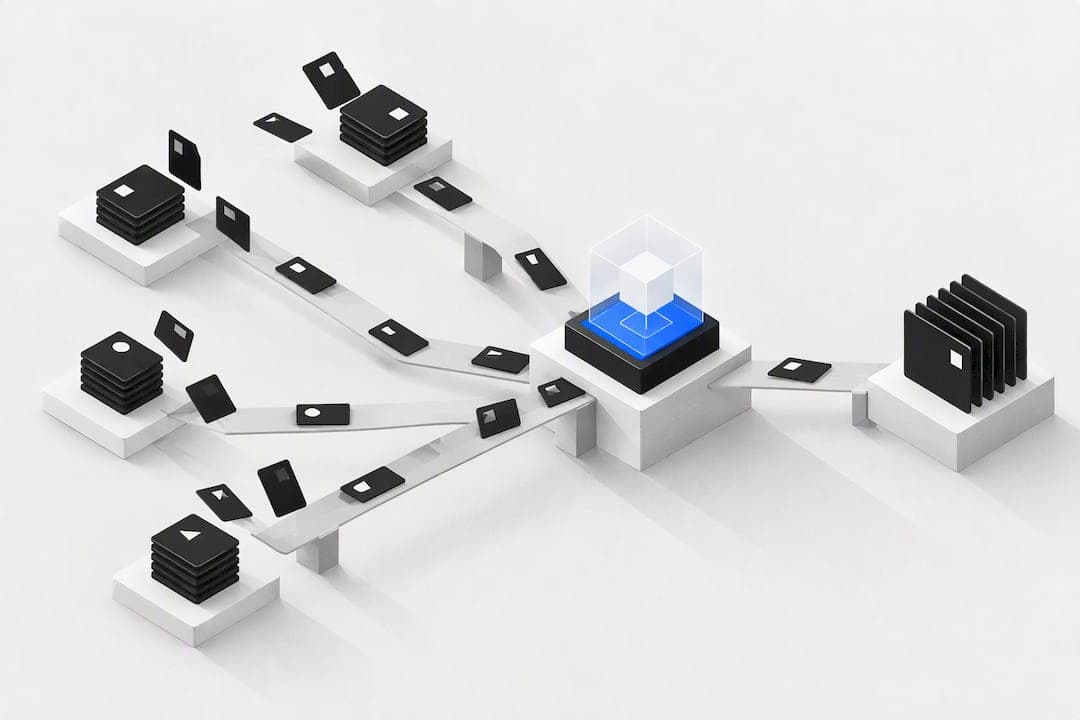
AI workflow automation combines decision-capable AI agents with orchestration logic, so teams cut manual handoffs and speed up complex, multi-step processes. It suits teams automating decision-heavy work such as invoice triage, vendor onboarding or lead qualification, where the payoff is faster cycle times, fewer errors, and clearer audit trails.
TL;DR:
- AI workflow automation requires connectors to legacy systems and support for decisioning models to handle unstructured inputs and complex tasks.
- Platforms should offer security, audit trails, extensibility, and pricing models aligned with actual usage to ensure enterprise readiness.
- Evaluations must include real-system testing, outcome metrics, governance compatibility, and scaled pilot plans before full deployment.
- A phased rollout with data readiness, process redesign, and change management minimizes risks and maximizes efficiency gains.
- Consolidating disconnected tools into a single platform reduces error rates and costs, with pay-per-action pricing better suited for variable workloads.
Table of Contents
- What AI workflow automation is and how it differs from traditional automation
- Key features and capability categories to look for in AI workflow platforms
- How to evaluate and choose a platform: criteria and procurement checklist
- Implementation roadmap and best practices for rolling out AI workflows
- Governance, safety and compliance: practical controls for AI workflows
- A unified platform approach to reducing tool sprawl
- Lessons and cautions from real deployments
- How OK Technology can help you consolidate workflows
- FAQ
- Sources
What AI workflow automation is and how it differs from traditional automation
Traditional automation follows fixed rules: if a field matches a condition, trigger an action. AI workflow automation adds a reasoning layer on top of that structure, so a system can read unstructured inputs, weigh options, and choose the next step rather than just following a script.
A useful way to think about this is a scale from simple rules to full autonomy. Deterministic workflows handle repeatable, rule-based tasks with no judgement required. ML-enhanced automation adds prediction or classification to an otherwise fixed workflow, for example flagging which invoices look likely to be disputed. Agentic AI sits at the top of that scale, where an AI agent can plan, call tools, and adjust its own next action based on context, with autonomy typically described in levels from basic suggestion (L0 or L1) through to largely independent execution (L3 or L4).
What actually changes at each step is the kind of augmentation involved:
- Summarisation: condensing a contract, email thread or support ticket into a decision-ready brief.
- Decisioning: scoring a lead, approving a refund within policy limits, or routing a case to the right team.
- Actioning: sending the invoice, updating the CRM record, or triggering a follow-up task without a person clicking a button.
A working AI workflow typically has four parts: connectors to the systems holding the data, an orchestration engine that sequences the steps, a decision or language model layer that handles judgement calls, and observability with retry logic so failures are caught rather than silently dropped. Representative examples include invoice triage that reads a PDF, checks it against a purchase order and routes exceptions to finance, customer triage that classifies and prioritises support tickets, and vendor onboarding that pulls compliance documents and flags missing paperwork before a contract is signed.
Key features and capability categories to look for in AI workflow platforms
Not every platform billed as "AI-powered" can handle a real enterprise process. A short checklist narrows the field quickly.
- Orchestration and connectors: native links to the enterprise apps and legacy systems the workflow actually touches, not just a generic API endpoint.
- Decisioning affordances: support for large language models or agents, the ability to call external tools, and rule engines with explicit retry logic for when a step fails.
- Security and data handling: encryption in transit and at rest, options for private or self-hosted deployment, and controls over where data is stored and processed.
- Observability and explainability: audit trails that show what decision was made, by which component, and why, so a human can review it after the fact.
- Extensibility: software development kits, continuous integration and deployment support, and version control for workflows as they evolve.
- Pricing model fit: whether the platform charges per seat, per consumption, or per action, and how that lines up with how heavily the workflow will actually be used.
Pro Tip: Ask any platform to show you a failed run end to end, not just a successful one. How it logs, retries and escalates a failure tells you more than any demo of the happy path.
Pricing model matters more than it first appears. A seat-based price punishes a team that only needs the tool occasionally, while a pay-per-action model tracks cost to actual usage, for example charging per invoice created or per lead generated rather than per license. That distinction becomes important once a pilot moves from a handful of test cases to live volume.
How to evaluate and choose a platform: criteria and procurement checklist
Procurement for an AI workflow platform should start with the outcome you are buying, not the feature list. Decide upfront whether success means time saved per case, a lower cost per transaction, or a measurable drop in error rate, because that choice shapes every test you run afterwards.
A practical evaluation rubric covers five areas:
- Outcome metric: define the single number that proves the pilot worked before you start it, such as average handling time or error rate per hundred cases.
- Governance alignment: check the vendor can produce logging, testing evidence, and an incident response process, aligned to guidance such as the NIST generative AI profile, which recommends inventorying systems and documenting data provenance and model versions.
- Integration fit: run a real test against your actual systems, not a sandbox, including at least one legacy system and one high-volume data source.
- Pilot design: scope the pilot tightly, with a defined dataset, explicit test plans, and acceptance criteria agreed before the first run.
- Total cost of ownership: model pricing scenarios at expected volume, since a pay-per-action rate that looks cheap at ten cases a day can scale very differently at ten thousand.
For the integration test specifically, pick one workflow that touches at least three systems, for example a CRM, an accounting tool and an email platform, and run it against real but anonymised records. That single test exposes more procurement risk than a week of vendor presentations, because it reveals how the platform behaves when a field is missing, a system times out, or a record is duplicated.
Implementation roadmap and best practices for rolling out AI workflows
A phased rollout keeps risk contained while still moving at a reasonable pace. Four stages work well for most teams.
- Discovery: map the current process step by step, identify where decisions are made today, and flag where data is incomplete or inconsistent.
- Pilot: run the automation on a limited, representative slice of real cases, with a human reviewing every decision before it takes effect.
- Scale: widen the dataset and reduce human review in proportion to measured accuracy, moving from spot checks to exception-only review.
- Operate: hand the workflow to its owning team with monitoring, a rollback plan, and a defined cadence for review.
The single biggest mistake teams make at this stage is redesigning only the task an AI touches, rather than the process around it. Capgemini's 2025 report on AI in business operations found that applying agentic AI at a higher process level, rather than automating isolated tasks, produces larger gains, because agents need end-to-end context to reason well. An invoice-matching bot bolted onto an otherwise unchanged approval chain rarely delivers much; redesigning the whole accounts payable process around what the agent can now do delivers more.
Data readiness work has to happen alongside process redesign, not after it. That means tracing where each data field originates, setting quality gates so bad records are caught before they reach the model, and agreeing who owns fixing a data problem when one surfaces.
Change management matters as much as the technology. Staff need training on what the workflow does and does not decide on its own, roles need to be redefined where a task moves from manual to supervised, and a governance body needs to exist before scale, not after an incident forces one into being.
Pro Tip: Build your rollback procedure before you need it. Decide in advance what "pause this workflow" looks like, who can trigger it, and how quickly a human can take back manual control.
Operational runbooks should cover monitoring thresholds, drift detection (watching for the model's accuracy degrading as inputs change over time), and a documented rollback procedure, so that when something goes wrong, the response is a known process rather than an improvisation. For teams documenting pilot decisions and trade-offs as they scale, a decision journal tool such as Betlog can help capture the reasoning behind each stage gate and the outcome it produced, which makes the after-action review at the end of a pilot considerably easier.
Governance, safety and compliance: practical controls for AI workflows
Governance is not a formality bolted onto a finished pilot. It is the difference between a workflow you can trust in production and one that quietly accumulates risk until something breaks.
Start with an inventory. Every AI-driven workflow in production should be logged, including what data it touches, which model or rule engine drives its decisions, and who owns it. The NIST generative AI profile recommends exactly this: inventorying AI systems, documenting data provenance and model versions, and defining a periodic review cadence alongside an incident response plan. Build the inventory before the pilot leaves the test environment, not after.
Specific controls worth embedding from day one:
- Access policies that limit who can change a workflow's rules or retrain its model.
- Data minimisation, so a workflow only touches the fields it actually needs.
- Testing, evaluation, verification and validation (TEVV) for any agent making consequential decisions.
- Supplier risk assessment for any third-party model or platform the workflow depends on.
- A rehearsed incident response plan, tested before it is needed rather than written after an incident.
Wavestone's global AI survey found that governance, not technical capability, is the primary barrier to scaling AI, with organisations increasingly standing up oversight committees and MLOps or LLMOps practices to manage the risk. That finding matters for procurement: a platform with strong orchestration but no audit trail will stall at the governance review, however good its demo looked.
Review cadence should be set in the pilot design, not left vague. A quarterly review, a documented red-teaming exercise ahead of any major scale-up, and an after-action review following every incident, however minor, keep governance active rather than theoretical.
A unified platform approach to reducing tool sprawl
Tool sprawl, where a team runs separate systems for CRM, billing, documents and campaigns, creates exactly the kind of handoff friction that AI workflow automation is meant to remove. Consolidating those functions into one platform addresses the root cause rather than automating around it.

Our own platform reflects that logic. We bring CRM, invoicing, document storage, campaign sends and project management into a single ecosystem rather than leaving them as separate tools a workflow has to bridge with connectors. We charge per action rather than per seat, so a lead generated, an invoice sent or a document stored is billed individually, and clients pay for what they actually use.
Picture an accounts receivable workflow built this way: an invoice is created in the platform, sent to the client, and any follow-up communication and payment record stay in the same system that holds the CRM history. There is no handoff between a billing tool and a separate CRM, because the record never leaves the ecosystem.
- Time spent reconciling data between separate tools is a practical first metric to track before and after consolidation.
- Error rate on handoffs, such as a payment recorded in one system but not reflected in another, is a second useful measure.
- Cost per action, once billed individually, makes it easier to see which workflows are worth automating further.
Lessons and cautions from real deployments
The teams that get the most from AI workflow automation treat governance as part of the build, not a compliance step added afterwards. The ones that struggle almost always skipped data readiness: they pointed an agent at a process with inconsistent records and were surprised when it made inconsistent decisions.
Build versus buy is rarely an all-or-nothing choice. A platform with strong orchestration and connectors, paired with a short, well-scoped professional services engagement, usually beats either a fully custom build or an off-the-shelf tool used without any configuration.
For procurement teams, the practical advice is simple: run a short, guardrailed trial on a real but low-stakes process before committing to anything wider. Keep a human in the loop until the error rate earns its removal, and resist the temptation to automate the whole process on day one.
— Paolo
How OK Technology can help you consolidate workflows
Our platform aims to help teams struggling with disconnected tools rather than teams shopping for one more point solution. CRM, project management, billing, document storage and campaign sends sit inside one ecosystem, so a workflow that today hops between four systems can run inside one.
Our pricing works per action rather than per seat: a lead costs between €0.02 and €0.87, an invoice created costs €0.03, and a document stored costs €0.25, all listed on our pricing page. That suits a team whose usage varies month to month far better than a fixed licence fee does.
- Review the full pricing and pay-per-action breakdown before estimating costs at your expected volume.
- Explore the platform overview to see which functions you could consolidate first.
- Book a consulting hour if you want help mapping your current tool stack onto a single workflow before you commit.
FAQ
Can you give an example of an AI workflow?
A common example is invoice triage: an AI step reads an incoming invoice, checks it against a purchase order, and either approves it automatically or routes it to a person when something does not match. Customer support triage works similarly, with a model classifying and prioritising incoming tickets before routing them to the right team.
Is Jira a workflow automation tool?
Jira includes rule-based workflow features for moving tickets between statuses and triggering notifications, which counts as traditional, deterministic automation. It does not natively provide the agentic reasoning or decision-making layer that defines AI workflow automation, though it can be connected to tools that add that capability.
What are the steps of a typical workflow?
A typical workflow moves through discovery, pilot, scale and operate: mapping the current process, testing automation on a limited dataset, widening it once accuracy is proven, and then running it with ongoing monitoring. Some teams add a fifth step, a formal governance review, between pilot and scale.
What are examples of automation outside AI workflows?
Examples include rule-based email triggers, scheduled data backups, automatic invoice numbering, form-based approval routing, and simple notification alerts when a field changes. These differ from AI workflow automation because they follow fixed rules with no judgement or adaptation involved.
How much does AI workflow automation cost on a pay-per-action platform?
Cost depends entirely on the actions a workflow performs, since pay-per-action pricing bills each task individually rather than charging a flat fee. On our platform, for example, generating a lead costs between €0.02 and €0.87 and creating an invoice costs €0.03, both listed on our pricing page.